The 60-second version:
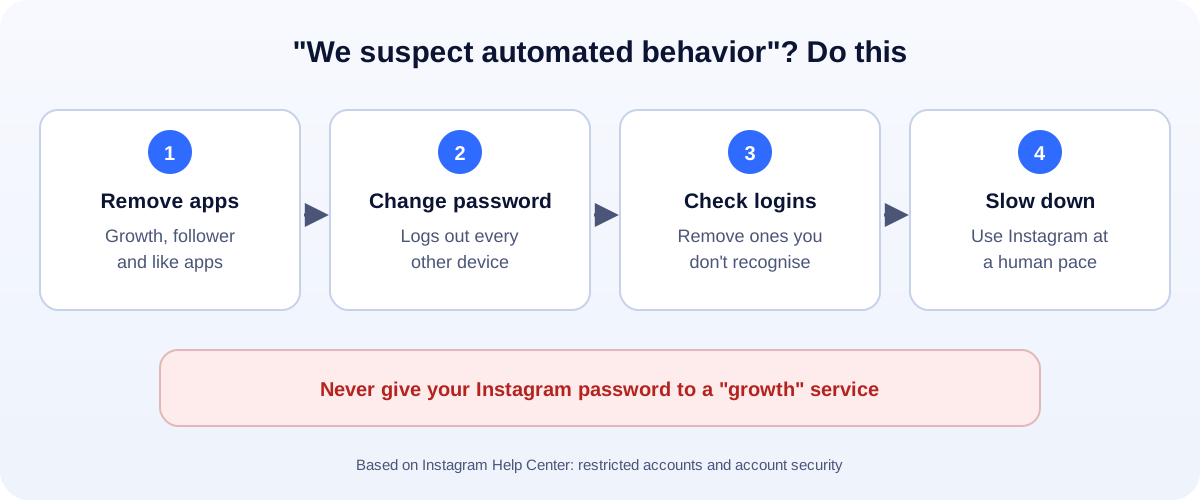
- Remove “growth” apps that like, follow, comment or DM for you.
- Change your password. That logs out every other device, including the app.
- Check your login activity and remove anything you don’t recognise.
- Turn on two-factor login.
- Slow down. Use Instagram at a normal, human pace for a while.
The pop-up says something like “We suspect automated behavior on your account.” It’s a warning, not a ban. But if you ignore it, a restriction can follow. Here’s what’s behind it and how to clear it, based on Instagram’s Help Center.
What triggers the warning
Instagram’s Help Center lists three causes for this kind of flag:
- Your account is automating access to Instagram or collecting information without permission.
- You gave your username and password to a third-party app or website, like apps that offer likes or followers.
- You used an app or service that interacts with Instagram in ways it doesn’t allow.
In real life, that’s usually one of these:
- Follower or like apps, even ones you tried once months ago.
- Auto-DM or auto-comment tools.
- “Who unfollowed me” or analytics apps that log in as you.
- A social media “manager” using your login on a tool.
- A hacked account being used for spam.
Step 1: Remove the apps
Think about every app or website you’ve ever logged in to with your Instagram password. Stop using them and delete them.
Then open Instagram’s settings, find Apps and websites, and remove anything you don’t use.
Step 2: Change your password
This is the step that actually cuts the cord. Instagram says changing your password logs you out of all devices, including any app that had your login.
Pick a strong password you don’t use anywhere else.
Step 3: Check your login activity
In Accounts Center, under Password and security, open Where you’re logged in. Remove any device or location you don’t recognise.
If you see logins from countries you’ve never been to, treat it as a hack. Our hacked Instagram guide has the next steps.
Step 4: Turn on two-factor login
Instagram recommends two-factor authentication for extra security. An authenticator app is stronger than text messages.
Step 5: Use Instagram like a person again
For the next few days:
- Follow, like and comment at a normal pace. No bursts of hundreds.
- Write your own comments. Not the same one again and again.
- Don’t log in from lots of new devices in a short time.
Think it’s a mistake?
If the message has an option to tell Instagram, use it. You can also use Report a problem in the app’s help settings. Keep it short and honest: “I don’t use any automation. Please review my account.”
If it turns into a restriction
Ignored warnings can lead to tighter limits:
- Action blocks on following, liking or commenting. See our action blocked guide.
- Lower reach. See our shadowban guide.
- Suspension in serious cases. See our suspended Instagram account guide.
Grow without automation
Real growth on Instagram comes from posts people want to share. Use the right image sizes, track what’s working with our engagement rate calculator, and keep your product photos clean with our free background remover. More help: all our account recovery guides.
How UMA can help
We grow Instagram accounts for small businesses with real content, not bots, so you never see this warning. We work remotely with U.S. small businesses and others worldwide. See our social media marketing service or get in touch.
Only Meta decides on account restrictions. This guide is general information based on the Instagram Help Center.