The 60-second version:
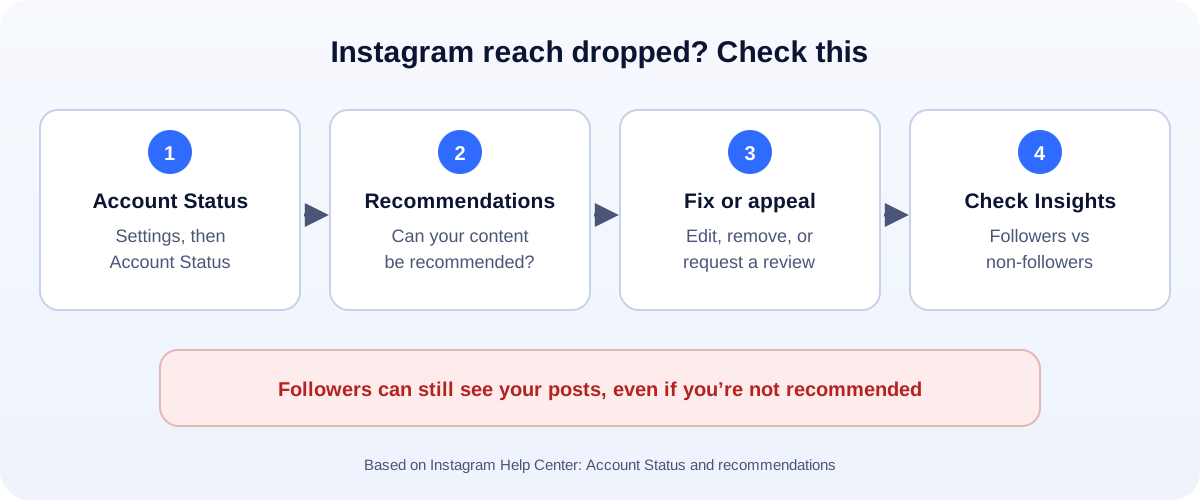
- Open Account Status. Go to Settings, then Account Status. (You’ll need a professional account.)
- Check “recommendations”. It says whether your content can be shown to non-followers.
- If it can’t, look at the sample posts Instagram shows you.
- Edit, delete, or request a review of each one.
- Check Insights for reach from followers vs non-followers.
Your reach was fine last week. Now your Reels get a fraction of the views, and everyone online says “shadowban”. Here’s the honest version: what’s really happening, how to check it for free, and how to fix it.
What people call a “shadowban”
Instagram doesn’t officially use the word. But it does decide which accounts and posts it recommends to people who don’t follow you. Instagram calls this recommendation eligibility.
Instagram says that if your account isn’t eligible, it won’t recommend your account or content on Reels, Feed, Explore, Search or Suggested Accounts to people who don’t already follow you.
That can feel exactly like a shadowban. Your followers still see you. New people don’t.
How to check for free (the official way)
Forget the “shadowban test” websites. Instagram has a built-in check:
- Use a professional account. Business or creator. Switching is free, in your account settings.
- Open Settings from your profile menu.
- Go to Account Status. If you can’t find it, type “Account Status” into the search bar in Settings.
- Look at recommendations. It tells you whether your content can be recommended right now.
If it can’t, Instagram shows you a sample of the posts that go against its Recommendations Guidelines, and which guideline applies.
Why posts become “not recommended”
Instagram’s examples of content that may not be recommended include:
- Content that may show violence, such as people fighting.
- Content promoting regulated products, such as tobacco or vaping.
- Sexually suggestive content, even if it’s allowed on the platform.
A few other things are worth checking, because they often go with these:
- Posts that were removed for breaking the Community Guidelines (also shown in Account Status).
- Spammy behaviour: mass following, copy-paste comments, bought followers or “engagement” apps.
- Misleading or clickbait posts.
And here’s the big one: Instagram says that if you repeatedly post content against the Recommendations Guidelines, your whole account may become ineligible. Then none of your content gets recommended, even the fine posts.
How to fix it
For each post Account Status shows you:
- Edit it, if a small change fixes the problem. A caption, a crop, a cover image.
- Delete it, if it can’t be fixed.
- Request a review, if you think Instagram got it wrong. Instagram says you may be able to ask its review team to take another look.
Then keep checking Account Status every few days.
Check it worked: use Insights
Account Status tells you about eligibility. Insights tells you what actually happened.
In Insights, look at Accounts reached, and break it down by followers and non-followers. If non-follower reach goes up again after a fix, recommendations are working.
It might not be a shadowban at all
Sometimes reach drops for normal reasons:
- Posting less often, or at different times.
- A format shift. If your audience loved Reels and you switched to photos, reach changes.
- Weaker hooks. The first two seconds of a Reel matter most.
- Seasonal dips. Holidays and slow months are real.
Compare your engagement rate over time, not just views. Our free engagement rate calculator does the maths. And use the right sizes: our social media image resizer helps posts look sharp.
Shadowban “checkers” and “unban” services
Be careful here:
- Checker tools can’t see inside Instagram. They guess from public data.
- Some ask for your password. Never give it. That’s how accounts get hacked. If it already happened, read our hacked Instagram recovery guide.
- Nobody can “remove” a shadowban for a fee. Only Instagram decides what it recommends.
Action blocked vs shadowban
They’re different:
- “Action blocked” means Instagram stopped you doing something, like following, liking or commenting, usually because you did a lot of it fast. Slow down and wait.
- Not recommended means your content isn’t shown to new people.
- Suspended is a whole different problem. See our guide to a suspended Instagram account.
How UMA can help
We plan and manage Instagram content for small businesses, keep accounts in good standing, and track what actually grows reach. We work remotely with U.S. small businesses and others worldwide. See our social media marketing service or get in touch.
Only Instagram decides what it recommends. This guide is general information based on the Instagram Help Center and Instagram’s guidance for creators.