The 60-second version:
- Stop doing the blocked action. Don’t keep tapping Follow or Like.
- Remove “growth” apps that like, follow or message for you.
- Changed nothing? Gave an app your password? Change it now.
- Tell Instagram if you think it’s a mistake, from the message or Report a problem.
- Come back slowly. Use Instagram at a normal, human pace.
You tap Follow and get a pop-up. “Try again later.” Or: “We limit how often you can do certain things on Instagram.” It’s annoying, and it usually comes at the worst time. Here’s what’s happening and how to fix it.
What “action blocked” means
Instagram limits how often you can do some things, like following, liking, commenting and sending DMs. The goal is to stop spam and bots.
If your account does a lot of one thing very fast, Instagram may block that action for a while. Everything else usually still works. You can post, scroll and watch Reels as normal.
The usual causes
- Too much, too fast. Following dozens of accounts in a few minutes, or liking hundreds of posts in a row.
- Copy-paste comments or DMs sent to many people.
- Automation and “growth” apps that like, follow or comment for you.
- “Free followers” apps that need your Instagram password.
- Logging in from many devices or places in a short time.
- People reporting your messages as spam.
New accounts often hit limits sooner. Instagram is more careful with accounts it doesn’t know well yet.
How to fix it
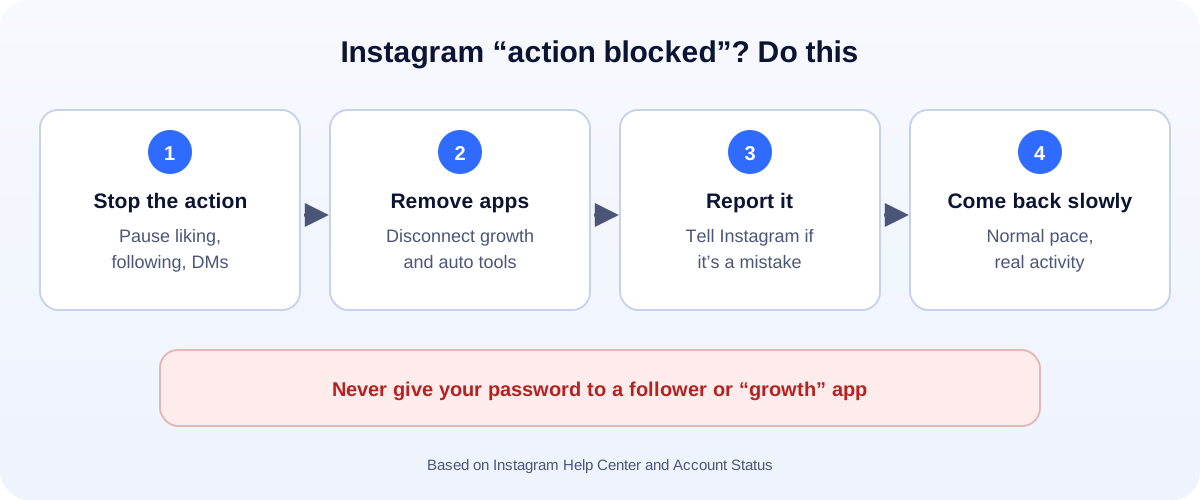
1. Stop the action
The worst thing you can do is keep trying. Each try looks like more of the same behaviour. Put the phone down for a while.
2. Remove automation apps
Go to your settings and look for apps and websites connected to your account. Remove anything that likes, follows, comments or messages for you.
If you ever typed your Instagram password into a third-party app or website, change your password now and turn on two-factor authentication.
3. Tell Instagram if it’s a mistake
The block message often has an option to tell Instagram you think it’s wrong. You can also use Report a problem in the app’s help settings. Keep it short and honest.
4. Check Account Status
Open Settings and find Account Status (type it into the settings search if you can’t see it). Instagram says it shows features you can no longer use, and lets you take action, such as appealing removed content.
5. Come back slowly
When the block lifts, don’t rush to “catch up”. Follow a few accounts, like what you actually enjoy, and write real comments. Normal behaviour is the fix.
How long does it last?
Instagram doesn’t publish a time. Many people find blocks lift within a few hours to a few days.
Repeating the behaviour usually makes the next block longer, and can lead to bigger restrictions, or even a suspension. If that happens, see our guide to a suspended Instagram account.
What doesn’t work
- Reinstalling the app. The limit is on your account, not your phone.
- Clearing the cache. Same problem.
- Switching to a new account to keep following. Making accounts to get around a restriction can put both at risk.
- Paying an “unblock” service. Nobody can lift Instagram’s limits for a fee.
Action blocked vs other problems
- Action blocked: you can’t do one thing for a while.
- Not recommended (“shadowban”): your posts aren’t shown to new people. See how to check for an Instagram shadowban.
- Hacked: someone else is using your account. See how to recover a hacked Instagram.
Grow without getting blocked
- Post good content instead of mass-following. Reach comes from posts people save and share.
- Reply to comments and DMs from real customers. That’s real engagement.
- Use the right sizes: our free social media image resizer helps.
- Measure what works with our engagement rate calculator.
How UMA can help
We grow Instagram accounts for small businesses the safe way: good content, real engagement and no risky tools. We work remotely with U.S. small businesses and others worldwide. See our social media marketing service or get in touch.
Only Instagram decides when limits are lifted. This guide is general information based on the Instagram Help Center.