The 60-second version:
- Save your photos first: Accounts Center, then Export your information.
- Open Accounts Center in Instagram’s settings.
- Go to Personal details, then Account ownership and control, then Deactivation or deletion.
- Choose Deactivate (temporary) or Delete account (permanent).
- Changed your mind? Log back in within 30 days to cancel a deletion.
Taking a break from Instagram, or leaving for good? Either way, it only takes a few taps, but the two options are very different. Here’s how each works and what you lose, based on Instagram’s Help Center.
Deactivate or delete?
| Deactivate | Delete | |
|---|---|---|
| Profile, photos, likes | Hidden | Removed for good |
| Followers | Kept | Lost |
| Come back? | Just log in | Only within 30 days |
| How often | Once a week | Once |
If you might come back, deactivate. If you’re sure, delete.
Step 1: Download your photos and data
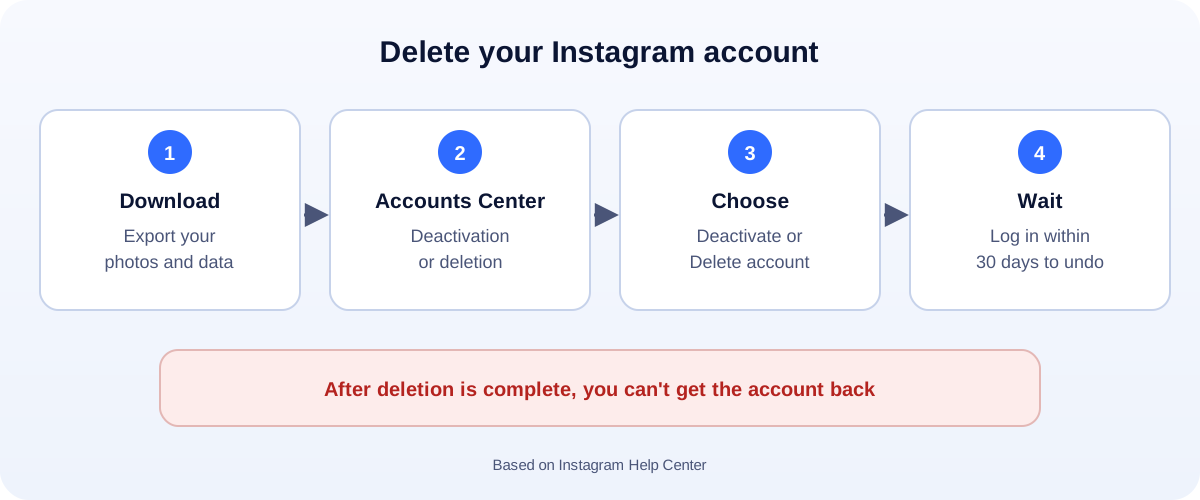
Do this first. Instagram says you won’t have access to the export tool once your account is deleted.
- Open Accounts Center from Instagram’s settings.
- Go to Your information and permissions, then Export your information (called Download your information on some versions).
- Choose your Instagram account, what to include and the format, then request the file.
Instagram emails you when the download is ready.
Step 2: Delete or deactivate (app or computer)
- In Instagram, open your profile, tap the menu, then Accounts Center.
- Tap Personal details, then Account ownership and control.
- Tap Deactivation or deletion and choose the Instagram account.
- Pick Deactivate account or Delete account, then Continue.
- Enter your password and follow the last steps.
The same steps work on a computer at instagram.com.
What happens next
- Deactivated: your profile, photos, comments and likes are hidden. Log back in any time to restore them. You can only deactivate once a week.
- Deleted: Instagram says your account and information are permanently deleted after 30 days. Log in before then to cancel. Instagram notes the full deletion process can take up to 90 days, and copies may stay in backups for a while.
Can’t log in to delete it?
If you’ve lost access, recover the account first, then delete it. Our guides cover a hacked Instagram account and a suspended Instagram account.
Business account? Think twice
Deleting a business profile loses your followers, reviews in comments and the links that bring customers. Alternatives:
- Deactivate while you rethink your plans.
- Switch to a personal account if you just want fewer business features.
- Hand it over to a teammate as an admin instead of deleting it.
If you’re leaving because growth stalled or posts aren’t reaching people, check our guides on shadowbans and the engagement rate calculator first.
How UMA can help
We run Instagram for small businesses, from strategy to content and reporting, so the account works for you instead of draining your time. We work remotely with U.S. small businesses and others worldwide. See our social media marketing service or get in touch.
This guide is general information based on the Instagram Help Center. Menu names can change with app updates.