The 60-second version:
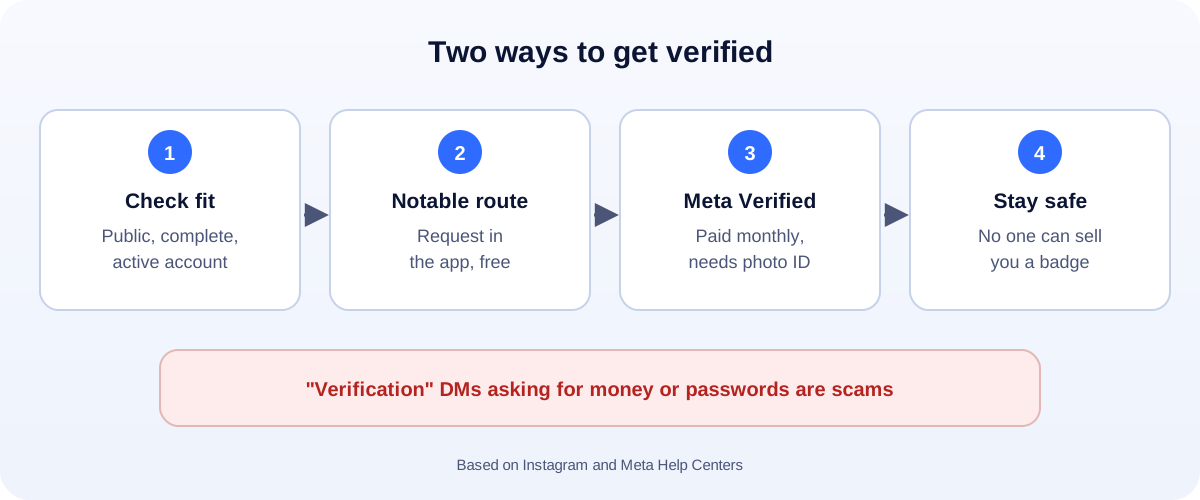
- Two routes: request a free badge as a notable account, or subscribe to Meta Verified.
- Free route: your account must be authentic, unique, complete and notable (featured in independent news).
- Paid route: Meta Verified needs a government photo ID, age 18+, and a monthly fee that varies by country.
- Make your profile complete first: public, bio, photo, recent posts.
- Ignore anyone selling a blue tick. It’s a scam.
The blue tick tells people they’ve found the real you, not a copycat. There are two ways to get one on Instagram now: the free badge for notable accounts, and the paid Meta Verified subscription. Here’s how each works, based on Instagram’s and Meta’s help pages.
Route 1: The free badge for notable accounts
Instagram reviews requests against four requirements:
- Authentic: a real person, registered business or entity.
- Unique: the only account for that person or business (language-specific accounts can be exceptions).
- Complete: public, with a bio, profile photo and recent activity.
- Notable: a well-known, highly searched for person, brand or entity. Instagram looks at whether you’ve been featured in multiple news sources, and says paid or sponsored media doesn’t count.
General-interest accounts, like meme pages, don’t qualify.
How to request it
- In the Instagram app, open your profile and the menu.
- Go to Account type and tools (or Professional dashboard on business accounts), then Request verification.
- Enter your full name, upload a government-issued photo ID (or business documents), and add links to news coverage.
- Submit and wait for the notification.
A request doesn’t guarantee a badge. If you’re turned down, keep building real press coverage before trying again.
Route 2: Meta Verified (paid)
Meta Verified is a monthly subscription that includes a verified badge after Meta confirms your identity. Meta’s requirements include:
- Being at least 18.
- Living in a country where it’s offered.
- A government-issued photo ID that matches your profile name and photo.
- An eligible Instagram or Facebook profile with some activity.
The price depends on your country and whether you subscribe on the web or in the app. Check the Meta Verified page for your local price. You subscribe from Accounts Center in Instagram’s settings.
Which route is right for you?
- Well-known person or brand with real press coverage? Request the free badge.
- Small business, creator or professional who wants protection from impersonation? Meta Verified is the realistic option.
- Neither yet? Focus on great content and real customers first. A badge doesn’t bring followers on its own.
Verification scams to avoid
Scammers love people who want a blue tick:
- DMs or emails saying “your account is eligible for verification, click here”.
- “Agents” who sell badges or press articles to make you “notable”.
- Requests for your password or login codes.
Instagram verification only happens in the app or through Meta Verified. Fell for one? See our hacked Instagram account guide.
Build a profile worth verifying
Fill in every part of your profile, post consistently and track what works. Use the right image sizes, check your engagement rate, and avoid the habits that trigger Instagram’s automated behavior warning.
How UMA can help
We help small businesses and professionals build a strong, consistent Instagram presence, with content, branding and reporting. We work remotely with U.S. small businesses and others worldwide. See our social media marketing service or get in touch.
This guide is general information based on the Instagram and Meta Help Centers. Only Meta decides who is verified, and prices and menus can change.