The 60-second version:
- Don’t panic, and don’t make a new account yet.
- Open the Instagram app and log in. You’ll usually see a screen saying the account is suspended.
- Read it carefully. Note the reason, the date, and how long you have to respond.
- Tap the option to disagree or request a review, and follow the steps.
- Wait. Check your email and the app. Never pay anyone who promises to “unban” you.
Getting locked out of Instagram feels awful, especially if it’s how your business finds customers. The good news: many suspensions are reversed when you appeal properly. Here’s exactly what to do.
Suspended vs disabled: what’s the difference?
People use the words interchangeably, and Instagram’s own wording changes over time. In practice:
- Suspended usually means Instagram has paused the account and given you a window to disagree with the decision.
- Disabled or permanently disabled usually means that window has passed, or an appeal was rejected.
Either way, the screen you see when you log in is your best guide. Take a screenshot of it. It shows the dates that matter for your case.
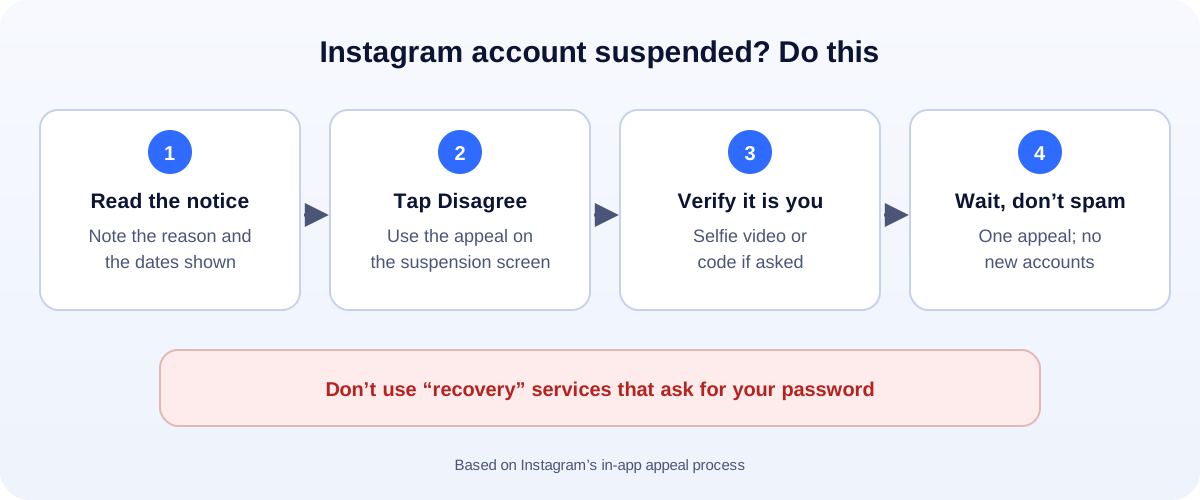
Step 1: Read the notice carefully
Look for three things:
- The reason. It might mention Community Guidelines, suspicious activity, or that the account “doesn’t follow our terms”.
- The deadline to respond. Many people see around 30 days to disagree.
- The final date. Often a countdown of about 180 days before the account is permanently removed.
Write the dates down. Then act early. The first few days matter most.
Step 2: Appeal the right way
On the suspension screen, choose the option to disagree with the decision (sometimes “Request a review” or “Appeal”). Then:
- Follow every step. Instagram may ask you to confirm it’s you, for example with a video selfie or a code sent to your email or phone.
- Be short and honest if there’s a text box: “This is my business account for [business]. I believe this was a mistake. I haven’t used any automation tools.”
- Submit once. Sending the same appeal many times doesn’t help and can slow things down.
Step 3: Secure everything while you wait
If the suspension might be linked to a hack (our hacked Instagram recovery guide covers this in detail):
- Change the password on the email account linked to Instagram.
- Turn on two-factor authentication on that email.
- Check other accounts that share the same password, and change them too.
- Remove apps you don’t recognise that you connected to Instagram, especially “follower” or “likes” apps.
Why Instagram suspends accounts (and how to avoid it)
The common triggers:
- Posts, comments or messages that break the Community Guidelines.
- Automation: follow/unfollow tools, mass liking, mass DMs, or bought followers.
- Sudden bursts of activity: for example sending lots of the same message to many people.
- A hacked account being used for spam.
- Being linked to another banned account, for example by the same phone number or email.
To stay safe:
- Don’t use apps that ask for your Instagram password.
- Don’t buy followers, likes or “engagement pods”.
- Keep business messaging personal, not copy-paste to hundreds of people.
- Turn on two-factor authentication and keep your email secure.
Not suspended, but your reach suddenly dropped? That’s a different problem. See how to check for an Instagram shadowban.
Beware of “recovery” scams
When your account is suspended, scammers appear in comments and DMs offering to get it back. Don’t pay them, and never share your password or login codes. Only Instagram can restore an account. Some will even pretend to be from Meta. Meta won’t contact you through DMs to ask for money.
If your appeal is rejected
Read the decision. If no further review is offered, the account may not come back. Take this as a chance to rebuild properly:
- Keep your customers reachable: make sure your website, Google Business Profile and WhatsApp are up to date.
- Make it easy to message you: our free WhatsApp link generator creates a click-to-chat link and QR code.
- Plan content you own: a blog and an email list don’t disappear if a platform locks you out.
How UMA can help
We manage Instagram and Facebook for small businesses, set up accounts securely, and help you build channels you own so one platform can’t shut you down. We work remotely with U.S. small businesses and others worldwide. See our social media marketing service or get in touch.
Only Instagram can restore an account. This guide is general information based on Instagram’s in-app appeal process.