The 60-second version:
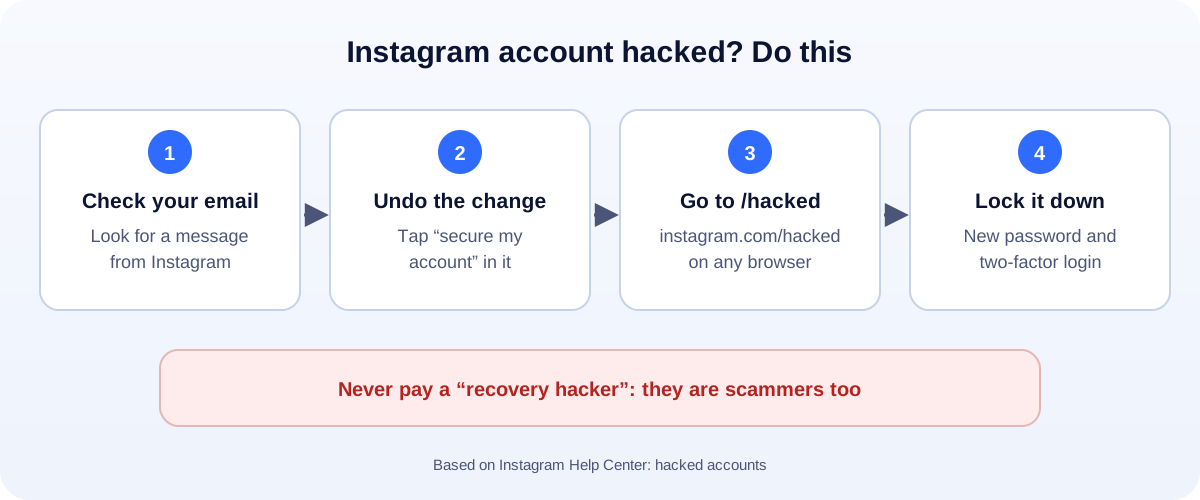
- Check your email first. Look for a message from security@mail.instagram.com.
- Email changed? Tap “secure my account” in that message to undo it.
- Still locked out? Go to instagram.com/hacked and follow the steps.
- Confirm it’s you if asked. That could be a code, a login link or a video selfie.
- Once you’re back in, change the password and turn on two-factor login.
Getting hacked is scary. Your photos, your messages, maybe your whole business, all in someone else’s hands. Take a breath. Instagram has a recovery path for exactly this, and it works more often than people think. Here’s how to use it.
First: how to tell you’ve been hacked
You might see one or more of these:
- You can’t log in, and your password no longer works.
- An email saying your email address or password changed, and it wasn’t you.
- Posts, stories or DMs you didn’t send. Often crypto or “investment” offers.
- Your username or profile photo changed.
- Friends messaging you to ask about strange messages from your account.
If you can still log in, skip to “If you can still get in” below.
Step 1: Look for Instagram’s email
When someone changes the email on your account, Instagram sends a message to your old address. It comes from security@mail.instagram.com.
Open it and tap secure my account. This can reverse the email change and help you lock the account again.
Check your spam folder too. And be careful: scammers send fake “Instagram” emails. Only trust messages from that exact address.
Step 2: Use instagram.com/hacked
If the email didn’t work, or the hacker also changed your password, go to instagram.com/hacked on your phone or computer.
You’ll be asked what happened. Choose the option that fits:
- My account was hacked
- I forgot my password
- I lost access to two-factor authentication
- My account has been disabled
Then follow the steps. Instagram may send a login link or security code to your email or phone number.
Step 3: Confirm your identity
If you can’t get a code, Instagram may ask you to prove the account is yours. For accounts with photos of you, that’s often a video selfie, where you turn your head in different directions.
A few tips:
- Use good light and a plain background.
- Use the same device you normally use for Instagram, if you can.
- Do it once and wait. Repeating it over and over doesn’t speed things up.
If you can still get in
Act fast, before the hacker locks you out:
- Change your password. Make it long and new. Don’t reuse an old one.
- Turn on two-factor authentication. An authentication app is safer than text messages.
- Check your email and phone number in settings. Fix anything you don’t recognise.
- Open Accounts Center and remove any linked accounts you don’t know.
- Remove apps you don’t recognise that have access to your account.
- Log out of other sessions you don’t recognise.
Then secure the email account linked to Instagram. If the hacker got into your email first, they can do it all again.
“Hacked and disabled”: when both happen
Hackers often use stolen accounts to send spam. That can get the account suspended, even though you did nothing wrong.
If you see a suspension screen, appeal from there. Or go to instagram.com/hacked and choose My account has been disabled. Say clearly that the account was hacked. Our guide to a suspended or disabled Instagram account walks through the appeal step by step.
Watch out for “recovery” scams
This part matters. When you post about being hacked, scammers show up fast.
- “Recovery hackers” in comments and DMs promise to get your account back for a fee. They take the money and disappear.
- Fake support numbers in search results look official. They aren’t.
- Fake “Meta” emails and DMs ask for your password or a login code.
Only Instagram can restore your account, through its own tools. Never share your password or a login code with anyone.
How to make sure it doesn’t happen again
- One password, one account. Use a password manager so you don’t reuse passwords.
- Two-factor login on Instagram and your email.
- Don’t log in through links in DMs. Open the app yourself instead.
- Skip “free followers” apps and tools that ask for your Instagram password.
- Give your team their own access. If you run a business account, don’t share one login around the office.
Protect your business while you wait
If Instagram is how customers reach you, give them another way in:
- Post an update on Facebook, your website and your Google Business Profile.
- Share a WhatsApp chat link. Our free WhatsApp link generator makes one, with a QR code.
- Warn your followers from another account not to click links or send money.
How UMA can help
We manage Instagram and Facebook for small businesses, set up accounts securely, and give each team member their own access. We work remotely with U.S. small businesses and others worldwide. See our social media marketing service or get in touch.
Only Instagram can restore an account. This guide is general information based on the Instagram Help Center.