The 60-second version:
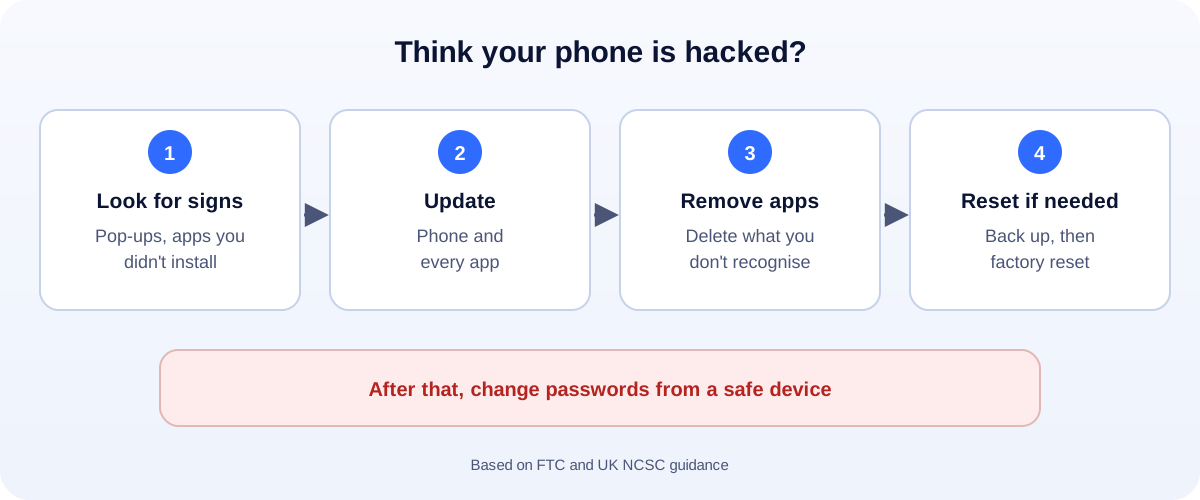
- Look for the signs: pop-ups, apps you didn’t install, messages you didn’t send.
- Update your phone and every app.
- Delete apps you don’t recognise.
- Still wrong? Back up, then factory reset. The UK’s cyber security agency calls it the safest fix.
- Change your passwords from a different, trusted device.
Your phone is acting strange. It’s slow, apps open by themselves, or a friend says you sent them a weird link. Is it hacked, or just old? Here’s how to tell, and what to do either way, based on guidance from the FTC and the UK’s National Cyber Security Centre (NCSC).
Signs your phone may be hacked
The FTC and the NCSC list warning signs like these:
- It’s slow, freezes or restarts by itself.
- Apps open or close on their own.
- Pop-ups appear asking you to do something unexpected, or ads show up where they shouldn’t.
- Apps or settings you don’t recognise appear.
- Friends get messages you didn’t send, or posts appear that you didn’t write.
Some people also notice their battery or mobile data running down much faster than usual. Those can have normal causes too, like an old battery or a new app, so look at the whole picture.
Step 1: Is it the phone or an account?
Often the problem is a hacked account, not the phone itself:
- Strange posts or messages on one app usually mean that account was hacked.
- Login codes you didn’t ask for mean someone is trying your password.
If that’s you, secure the account first. Our guides cover Instagram, Facebook and Gmail.
Step 2: Stop logging in to sensitive accounts
The FTC’s first tip: if you think a device has malware, stop logging in to banking, shopping and other sensitive accounts on it until it’s clean.
Step 3: Update everything
Install the latest iOS or Android update, then update every app. Updates often fix the security holes that malware uses.
Step 4: Remove apps you don’t recognise
- iPhone: check your home screens and the App Library, and remove anything you didn’t install. Also check Settings > General > VPN & Device Management for profiles you didn’t add.
- Android: open Settings > Apps, look for apps you don’t recognise, and uninstall them. Run Google Play Protect from the Play Store.
Step 5: Factory reset if problems continue
For phones and tablets, the NCSC calls a factory reset the safest solution.
- Back up your photos, contacts and chats.
- Reset from Settings. This wipes everything on the phone.
- Restore only from a backup made before the problems started. Restoring a recent backup can bring the problem back.
- Reinstall apps only from the official App Store or Google Play.
Step 6: Lock down your accounts
From a different, trusted device:
- Change passwords, starting with your email account, then banking and social media.
- Turn on two-step verification, ideally with an authenticator app.
- Check where you’re logged in on your Apple or Google account and remove devices you don’t know.
Lost money? Report it
- US: call your bank using the number on your card, then report it at ReportFraud.ftc.gov.
- UK: call your bank, then report it to Report Fraud at reportfraud.police.uk or 0300 123 2040. In Scotland, call Police Scotland on 101.
Keep it from happening again
- Keep automatic updates on.
- Lock your phone with a strong passcode. The FTC suggests at least six digits.
- Only install apps from official stores.
- Don’t tap links in unexpected texts. Read our guide to spotting scam texts.
- Turn on Find My iPhone or Find My Device so you can lock or erase a lost phone.
Your phone runs your business?
If your WhatsApp, Instagram and email all live on one phone, a hacked phone can stop your business for days. Keep business accounts protected with two-step verification and a second admin, and give customers more than one way to reach you, like a WhatsApp chat link and a proper website. More help: all our account recovery guides.
How UMA can help
We build websites and apps for small businesses and set up accounts securely, so one lost or hacked phone doesn’t shut you down. We work remotely with U.S. small businesses and others worldwide. See our app development service or get in touch.
This guide is general information based on FTC and UK NCSC guidance. If you’ve lost money, contact your bank first.