The 60-second version:
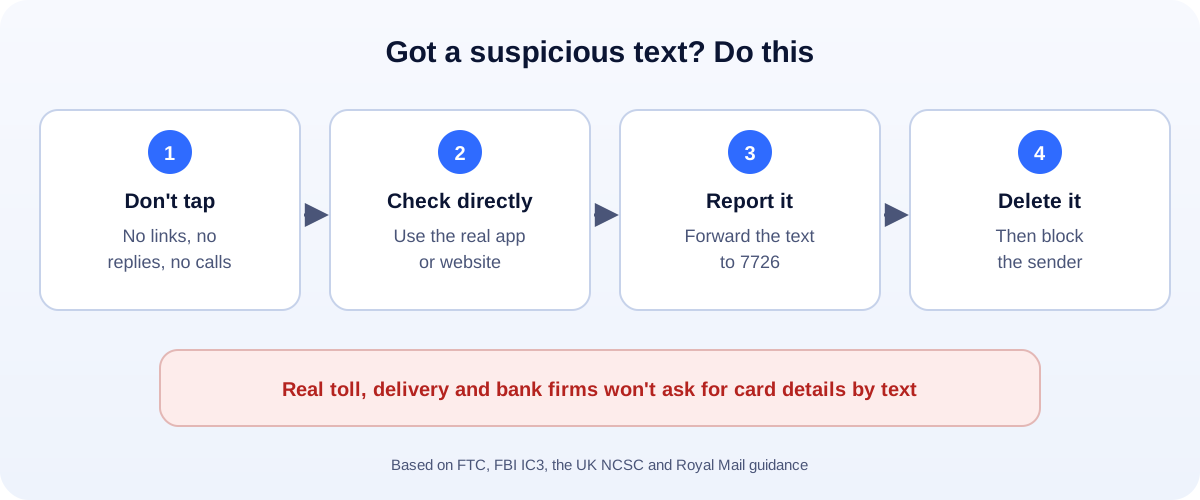
- Don’t tap the link. Don’t reply, and don’t call any number in the text.
- Check directly. Open the company’s own app, or type its website yourself.
- Report it. Forward the text to 7726. It’s free in the US and the UK.
- Delete and block the sender.
- Clicked and paid? Call your bank now, using the number on your card.
“Your toll balance is overdue.” “We couldn’t deliver your parcel.” “Unusual activity on your account.” Scam texts like these hit millions of phones every week in the US and the UK. They look official, they’re short, and they push you to act fast. Here’s how to spot them and what to do, based on guidance from the FTC, the FBI, the UK’s National Cyber Security Centre (NCSC) and Royal Mail.
The scam texts going around now
- Unpaid road tolls. A text says you owe a small toll and will get a late fee. The FBI’s Internet Crime Complaint Center has reported thousands of complaints about these texts, which copy the names of real state toll services.
- Missed or held parcels. “Your package is waiting.” “Pay a small fee to redeliver.” These copy delivery firms such as USPS and Royal Mail.
- Bank or account alerts. “Suspicious activity on your account” or a fake invoice, with a link to “fix” it.
- Prizes and gift cards. The FTC is blunt: they’re not real.
- Wrong-number chats. A friendly “Is this Sam?” text that turns into a long conversation, then a money or investment pitch.
How to spot a scam text
Most scam texts share a few signs:
- You weren’t expecting it. No order, no trip, no recent contact.
- There’s a link, often shortened or with an odd web address.
- It asks for money or details, like a card number, password or bank login.
- It creates urgency: “today”, “final notice”, “late fee”.
- The sender looks odd, such as an email address or a long, random number.
The FTC puts it simply: legitimate companies won’t ask for information about your account by text.
In the US: what to do
- Don’t click. Delete the text after you report it.
- Check the real account. For tolls, use your toll agency’s official website or app, or call the number on its website. For parcels, use the carrier’s own tracking page.
- Forward the text to 7726 (it spells SPAM). This helps your wireless provider block similar messages.
- Report it to the FTC at ReportFraud.ftc.gov.
- For toll texts, the FBI also asks people to file a complaint at ic3.gov, with the sender’s number and the website in the text.
In the UK: what to do
- Don’t click.
- Forward the text to 7726 for free. The NCSC says this lets your provider trace the sender and block or ban them.
- Royal Mail scams: take a screenshot and email it to reportascam@royalmail.com.
- Lost money or got hacked? Report it to Report Fraud at reportfraud.police.uk or 0300 123 2040. In Scotland, call Police Scotland on 101.
Royal Mail says it only texts or emails about tracking when the sender asked for tracking updates. It will never ask for passwords or bank details.
Report it from your phone, too
- iPhone: in Messages, tap Report Junk under a message from an unknown sender.
- Android: in Google Messages, use Report spam when you block the sender.
Your phone’s built-in filters also help. Turn on filtering of unknown senders so these texts land in a separate list.
Already clicked? Do this now
- Only opened the page? Close it, don’t enter anything, and delete the text.
- Entered card or bank details? Call your bank now, using the number on your card. Ask them to block the card and watch for payments.
- Entered a password? Change it, starting with your email account, and turn on two-step verification.
- Installed something? Read our guide on how to tell if your phone is hacked.
- Report it using the steps above, even if you lost nothing. It helps stop the next person.
Run a business? Protect your customers too
Scammers copy real brands, including small ones. Tell customers how you will and won’t contact them, keep your official links easy to find, and use a clear WhatsApp chat link so people know the real way to reach you. If your accounts were targeted, see all our account recovery guides.
How UMA can help
We set up websites, email and social accounts for small businesses with security in mind, so customers know which messages really come from you. We work remotely with U.S. small businesses and others worldwide. See our website design service or get in touch.
This guide is general information based on guidance from the FTC, the FBI’s IC3, the UK NCSC and Royal Mail. If you’ve lost money, contact your bank first.