The 60-second version:
- iPhone: Settings, Apps, Phone, then set Unknown Callers to Silence.
- Android: in the Phone app settings, turn on Filter spam calls.
- Ask your carrier about its spam blocking. Some of it is free.
- Register your number: Do Not Call (US) or TPS (UK) for sales calls.
- Never press a number on a robocall, and report scam calls.
Your phone rings, you don’t know the number, and it’s another “car warranty”, “parcel problem” or silent call. Spam calls waste time and some are scams. You can cut most of them with a few settings that are already on your phone. Here’s how, based on guidance from the FTC, Apple, Google and Ofcom.
Step 1: Turn on your phone’s built-in filters
iPhone:
- Open Settings, then Apps, then Phone.
- Under Unknown Callers, choose Silence. Calls from numbers not in your contacts go straight to voicemail. You can also choose Ask Reason for Calling to screen them first.
- Under Call Filtering, turn on the spam filter if your carrier offers it. Likely spam is silenced and moved to a Spam list.
Filtered calls still appear under Filter in the Phone app, so you can check for anything important.
Android (Google Phone app):
- Open the Phone app, tap More options, then Settings.
- Open Caller ID and spam (on newer versions, Spam and Call Screen).
- Turn on See caller ID and spam and Filter spam calls.
On phones with Call Screen, its spam blocking does this job instead. Samsung and other brands have similar settings in their own phone app.
Step 2: Use your carrier’s free blocking
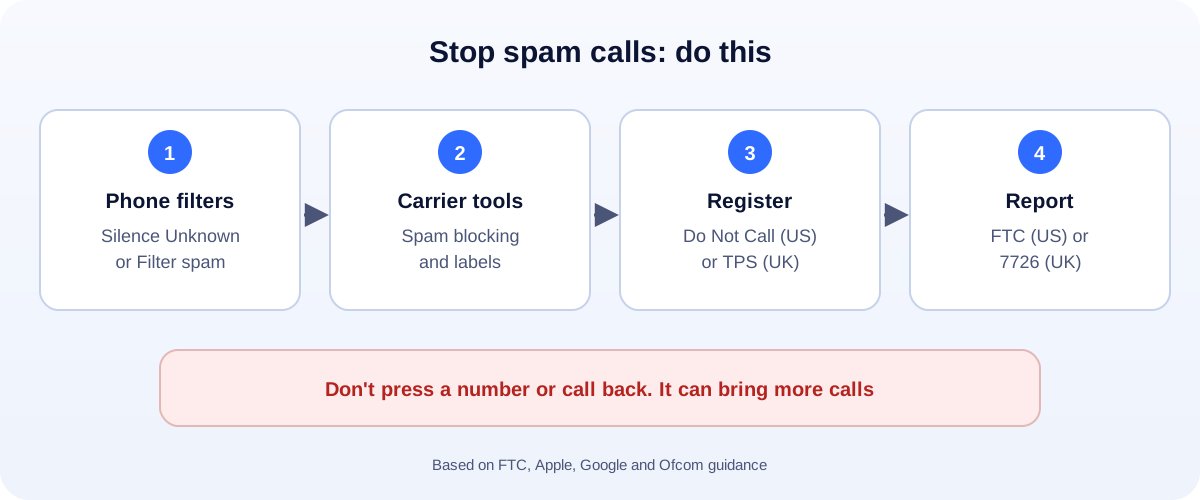
Many mobile networks offer spam call blocking or labelling, often through their app. Some of it is free; some costs extra. The FTC calls blocking and labelling “your best defense” against unwanted calls. Check your carrier’s website or app and switch it on.
Step 3: Register your number
US: National Do Not Call Registry. Add your number at DoNotCall.gov. It stops sales calls from legitimate companies. The FTC is clear that it won’t stop scammers, but once you’re on it, any sales call is a red flag.
UK: Telephone Preference Service (TPS). Register free with the TPS (0345 070 0707). UK organisations are not allowed to make live sales calls to registered numbers. Like the US list, it doesn’t stop scammers.
Step 4: What to do when a spam call gets through
- Don’t answer unknown numbers if you can let them go to voicemail.
- Hang up on robocalls. The FTC says don’t press a number, even “to be removed”. It can lead to more calls.
- Never give personal or bank details to someone who called you. Call the company back on a number you know.
- Block the number from your recent calls list.
Step 5: Report scam calls
US:
- Unwanted sales calls: report at DoNotCall.gov.
- Lost money or have details about the caller: report at ReportFraud.ftc.gov. Include the number, the caller ID shown and the date and time.
UK:
- Text the scam caller’s number to 7726. Ofcom says this alerts your mobile provider, which can investigate and block it.
- Lost money: report to Report Fraud on 0300 123 2040 or reportfraud.police.uk. In Scotland, call Police Scotland on 101.
Landlines
For a home phone, ask your provider about call blocking. The FTC also suggests a call-blocking device that plugs into a traditional landline.
Getting scam texts too?
Read our guide on how to spot and report scam texts. Worried someone already got into your phone? See how to tell if your phone is hacked.
Small business? Don’t miss real customers
Silencing unknown callers can also silence new customers. If your business phone is your mobile, give customers another easy way to reach you, like a WhatsApp chat link, a contact form or a booking link, and check voicemail daily.
How UMA can help
We set up websites, contact forms and WhatsApp for small businesses so real customers can always reach you, even with spam filters on. We work remotely with U.S. small businesses and others worldwide. See our website design service or get in touch.
This guide is general information based on FTC, Apple, Google and Ofcom guidance. Menu names can change with phone updates.