
The 60-second version:
- Go to the Google sign-in page and choose Forgot password.
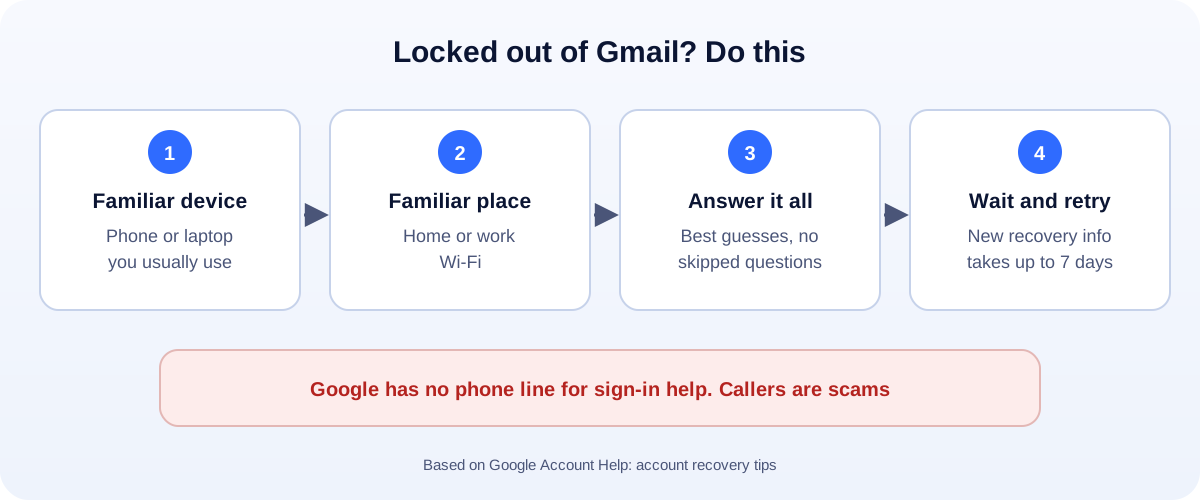
- Use your usual phone or laptop, in a place you usually sign in, like home or work.
- Answer every question. Take your best guess. Don’t skip.
- Use your recovery email if your phone number is gone.
- Never call a “Gmail support number”. Google doesn’t offer phone help for sign-in.
Your Gmail is the key to almost everything: banking, shopping, your business tools, maybe your YouTube channel. Being locked out is stressful. The good news is that Google’s recovery tool is fairly forgiving, if you use it the right way.
Step 1: Start the recovery
- Go to the Google sign-in page (accounts.google.com).
- Type your Gmail address.
- Click Forgot password?
- Follow the steps.
Forgot the email address itself? Choose Forgot email? on the sign-in page instead. You’ll need the phone number or recovery email linked to the account, plus your name.
Step 2: Help Google recognise you
Google is trying to tell whether you are the owner or a hacker. These tips come straight from Google:
- Use a device you often sign in with. Your usual phone, tablet or computer.
- Be somewhere you usually sign in, like home or work, on the same Wi-Fi.
- Use the same browser you normally use, like Chrome or Safari.
These details matter more than most people think. Trying from a friend’s laptop in a new city makes recovery much harder.
Step 3: Answer the questions well
- Don’t skip questions. If you’re unsure, take your best guess.
- Last password you remember? Type the most recent one you can recall. An old one is better than nothing.
- Watch the details. Capital letters and typos count.
- Recovery email: Google may send a code there. Check that inbox, including spam.
Google says wrong guesses won’t kick you out, and there’s no limit to how many times you can try.
No phone number? Here’s what still works
“Gmail recovery without phone number” is one of the most common searches. You still have options:
- Your recovery email. Google can send the code there instead.
- Your usual device. If you’re still signed in on a phone or tablet, Google may ask you to confirm there.
- Good answers. The more questions you answer correctly, the better your chances.
If you just changed your recovery phone or email, wait. Google says changes can take up to 7 days to take effect. Try again after that.
Beware of “Gmail support” scams
This is important. Google says:
- You can’t call Google for help signing into your account.
- Google doesn’t work with any service that claims to offer account or password support.
- Google never asks for your password or verification codes by email, phone call or message.
So any “Gmail customer care number” you find online is a scam. They’ll ask for your codes, or for money, and then take your account.
Only type your password and codes at accounts.google.com.
If recovery keeps failing
- Wait a few days and try again from your usual device and place.
- Try older passwords you might have used.
- Think about where you created the account. Same city, same device, if possible.
- Last resort: Google suggests creating a new account. Then update your email on important sites (bank, shopping, work tools) as soon as you can.
Once you’re back in: lock it down
Do these five things today:
- Change your password to something long that you don’t use anywhere else.
- Turn on 2-Step Verification. Use the Google prompt or an authenticator app.
- Add a recovery email and phone that you’ll keep for years.
- Run Google’s Security Checkup and remove devices you don’t recognise.
- Save backup codes somewhere safe, offline.
Business owners: don’t tie everything to one inbox
If your business runs on one personal Gmail, a lockout can stop your ads, website, YouTube and Google Business Profile at once.
- Give a second trusted person access to key accounts, with their own login.
- Use a business email on your own domain for important services.
- Write down which tools use which email. It saves hours in an emergency.
Related: YouTube channel terminated? · Google Business Profile not verified? · Google Ads account suspended?
How UMA can help
We set up websites, business email and Google tools for small businesses, with proper access for each team member so one lockout doesn’t stop the business. We work remotely with U.S. small businesses and others worldwide. See our website design service or get in touch.
Only Google can restore access to a Google Account. This guide is general information based on Google Account Help.