


The 60-second version:
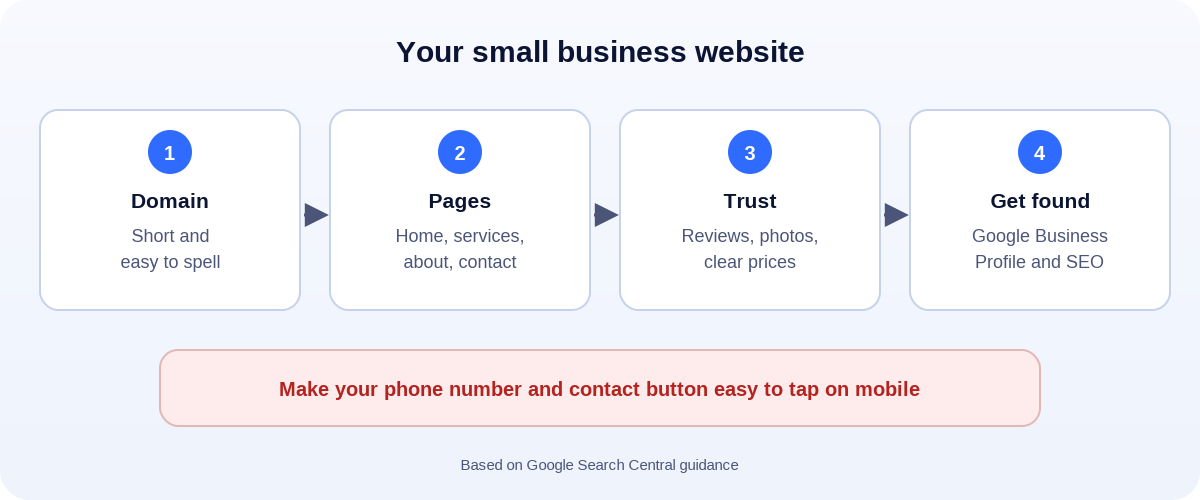
- Pick a domain: short, easy to spell, ideally .com or .co.uk.
- Plan four core pages: home, services, about, contact.
- Build trust: real photos, reviews, clear prices or starting prices.
- Make it mobile-friendly with a big call or WhatsApp button.
- Get found: Google Business Profile, Search Console and good page titles.
Most customers look a business up online before they call, visit or buy. A clear, fast website turns that search into a customer. Here’s how to plan one step by step, from our experience building small business sites and from Google’s own guidance.
Step 1: decide what the website must do
Write down the one main action you want visitors to take: call, book, buy, request a quote, or visit. Every page should make that action easy.
Step 2: choose a domain name
- Short and easy to spell when said out loud.
- Use your business name, or name plus town.
- .com works everywhere; .co.uk signals a UK business.
- Avoid hyphens and numbers.
- Register it in your own name or business account, not your designer’s.
Step 3: plan your pages
- Home: what you do, who for, where, and the main action button.
- Services or products: one section, or one page each for your main services.
- About: your story, team and why people choose you.
- Contact: phone, email, address, map and opening hours.
Then add reviews, a FAQ and, for local businesses, a page for each area you serve.
Step 4: DIY or hire a professional?
Website builder (DIY):
- Cheaper up front and quick to start.
- You’ll need time to learn it and write content.
- Can be limited for speed, SEO and custom features.
Professional build:
- Custom design that fits your brand.
- Better speed, SEO and features like booking, payments or WhatsApp chat.
- Costs more up front; ask what support and updates are included.
Step 5: write content people trust
- Use real photos of your work, team and premises.
- Show reviews from real customers. See our Google reviews guide.
- Give prices or starting prices where you can.
- Write the way you speak to customers, not in jargon.
Step 6: make it fast, mobile and accessible
- Most visitors are on phones. Put a tap-to-call or WhatsApp chat button where it’s easy to reach.
- Compress images so pages load fast; our free image compressor helps.
- Follow accessibility basics from WCAG: readable text, good contrast, image descriptions and working keyboard navigation.
Step 7: get found on Google
- Give every page a clear title and description. Preview them with our SERP preview tool.
- Follow Google’s SEO Starter Guide: helpful content, descriptive links, and a logical structure.
- Create or claim your Google Business Profile. See our guide to adding your business to Google Maps.
- Add your site to Google Search Console to see how people find you.
- Make your content easy for AI search tools to quote; see our AI search guide.
Step 8: keep it alive
Update prices, photos and opening hours, add new reviews and projects, and keep software up to date. A stale website quietly costs you customers.
What drives the cost
Number of pages, custom design, content writing, photography, online shop or booking features, and ongoing hosting and support. Ask for a clear, written quote. Thinking about SEO too? See how much SEO costs.
How UMA can help
We design and build fast, mobile-friendly websites for small businesses, with SEO, Google Business Profile setup and WhatsApp built in. We work remotely with U.S. small businesses and others worldwide. See our website design service or get in touch.
This guide is based on Google Search Central, SBA and W3C guidance and our own experience building small business websites.