
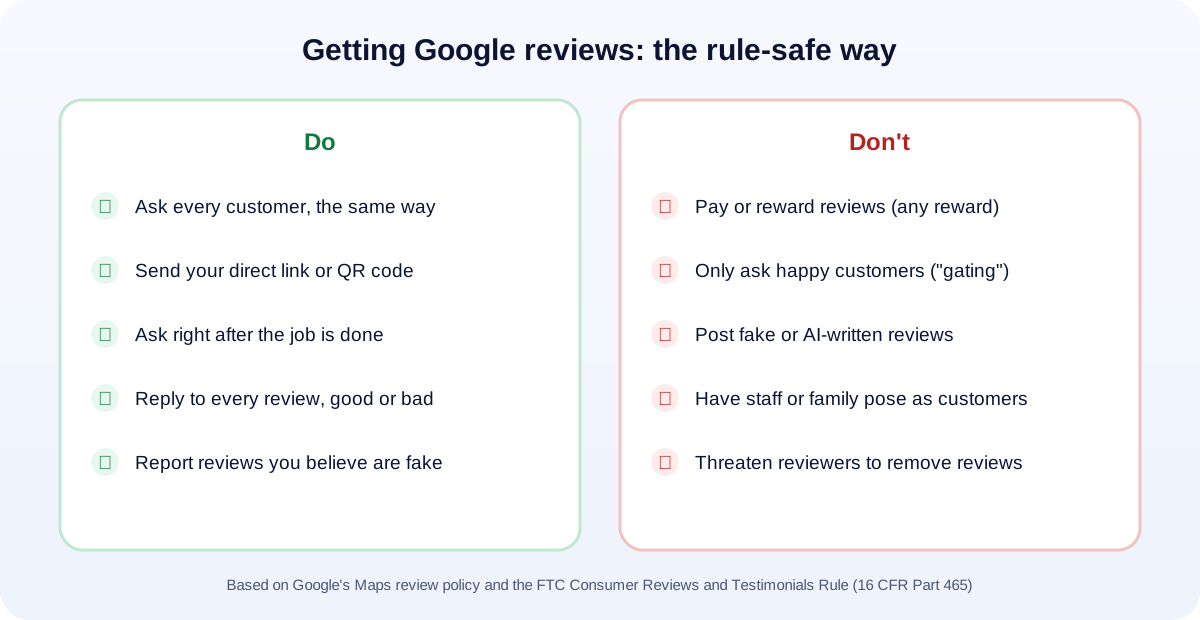
Short answer: the businesses with the most Google reviews aren’t doing anything clever. They ask every customer, right after a good experience, with a direct link that takes one tap. That’s it. What you must not do is pay for reviews, offer anything in return for them, write them yourself, or only ask the customers you know are happy. Those break Google’s rules, and some of them break federal law under the FTC’s fake review rule.
Reviews matter for two reasons. People read them before they call you, and Google uses them when it decides which businesses to show in local search. Below are the rules in plain English, the methods that work, and templates you can copy today.
The rules, in plain English
There are two rulebooks, and you need to follow both.
The FTC’s rule (federal law)
Since October 21, 2024, the FTC’s Trade Regulation Rule on the Use of Consumer Reviews and Testimonials (16 CFR Part 465) has been in force. According to the FTC, it bans (FTC):
- Fake reviews and testimonials, including AI-generated ones and reviews from people who never used your business.
- Paying for a particular sentiment. You can’t offer compensation “conditioned on the writing of consumer reviews expressing a particular sentiment.”
- Undisclosed insider reviews. Owners, managers and employees who review the business must clearly disclose the connection.
- Review suppression, such as using “unfounded or groundless legal threats” or intimidation to get reviews removed.
- Fake social proof, such as bought followers or bot-generated views.
The rule lets the FTC seek civil penalties against people who knowingly break it. The maximum civil penalty for this kind of violation was raised to $53,088 per violation in January 2025. (FTC) That’s per violation, so a batch of fake reviews adds up fast.
Google’s policy (stricter in one important way)
Google’s rules for reviews on Maps and Search go further than the FTC’s. Its policy says businesses must not (Google Maps user-generated content policy):
- “Offer incentives – such as payment, discounts, free goods and/or services – in exchange for posting any review.” Note the word any. Even an honest review can’t be rewarded on Google.
- “Discourage or prohibit negative reviews, or selectively solicit positive reviews from customers.” This is called review gating: sending a “how did we do?” survey and only passing happy customers to Google.
- Ask staff to collect “a certain number of reviews” or reviews with “specific content.”
What Google does allow: asking customers to post reviews that reflect a genuine experience, “without offering incentives to do so.”
Step 1: Get your direct review link
Don’t make customers search for you and then hunt for the review button. Most of them will give up.
- Sign in to your Google Business Profile (search your business name on Google while signed in, or use the Business Profile Manager).
- Find the option to ask for reviews (Google sometimes labels it “Get more reviews” or “Ask for reviews”).
- Copy the short link. That link opens the review box directly.
- Turn it into a QR code for your counter, receipts or job sheets. Any free QR generator works; test it with your own phone first.
Step 2: Ask at the right moment
Timing matters more than wording. Ask when the customer has just felt the benefit:
- A plumber: right after the leak is fixed and the customer has turned on the tap.
- A dentist: at checkout, after a good visit.
- A restaurant: when the check arrives, not three days later.
- An online or remote service: when you deliver the result, or when the customer says thanks.
If you can’t ask in person, send a text the same day. A request that arrives a week later competes with everything else in their inbox.
Step 3: Make it easy (templates you can copy)
Keep it short and personal, and include the link. Here are templates you can adapt.
Text message (same day):
Hi Sarah, thanks again for choosing Smith Plumbing today. If you have a minute, would you share how it went on Google? It really helps a small business like ours: [link]. Thank you! Mike
Email (for service businesses):
Subject: How did we do, Sarah?
Hi Sarah,
Thanks for trusting us with your kitchen remodel. We hope you’re enjoying it.
Would you mind leaving a quick review on Google? Honest feedback helps other homeowners decide, and it helps us improve.
[Leave a review]
Thank you, Dana, Smith Home Services
In person (staff script):
“We’re a local business and Google reviews really help people find us. Would you be open to leaving one? I can text you the link right now.”
Notice what isn’t in these: no “5-star” request, no discount, no “if you were happy.” Ask for an honest review, from everyone.
Step 4: Build it into your routine
One-off pushes fade. The businesses that keep growing their reviews build the ask into something they already do:
- Invoices and receipts: add the QR code and one line: “Tell us how we did on Google.”
- Job completion: your technician sends the text before leaving the driveway.
- Email signature: a small “Review us on Google” link.
- Follow-up emails or SMS: if you use booking or CRM software, add the review request to the “job completed” automation, sent to every customer, not a filtered list.
- Thank-you cards: for higher-value services, a handwritten note with a QR code goes a long way.
Avoid uploading a big batch of old customers at once. A sudden flood of reviews can look unnatural, and those customers barely remember you anyway. Steady and ongoing is better.
Step 5: Reply to every review
Replying shows future customers that a real person runs the business, and Google treats responding as good practice.
- Positive reviews: thank them by name, mention the specific job, keep it short. Don’t paste the same reply on every review.
- Negative reviews: reply calmly and quickly. Acknowledge the problem, don’t argue in public, and offer to fix it offline: “I’m sorry this happened, Tom. Please call me directly at… so I can make it right.”
- Reviews you believe are fake (no record of the customer, a competitor, spam): don’t threaten the reviewer. Report the review through your Business Profile and let Google assess it. Threats can cross into the review suppression the FTC rule prohibits.
What not to do (even if a competitor does)
- Buying reviews, or using “review exchange” groups.
- Offering a discount, freebie or prize draw for reviews.
- Asking family, friends or staff to post reviews as if they were customers.
- Writing reviews yourself, with or without AI.
- “Gating”: only sending the review link to customers who rated you highly in a survey.
- Paying for software that promises to remove negative reviews through pressure or legal threats.
Fake reviews can disappear in Google’s spam filters, get your Business Profile restricted, and now carry federal penalties. If your profile has already been hit, see our guide on what to do when your Google Business Profile is suspended.
How many reviews do you need?
There’s no magic number. Look at the three businesses that show up in the map results for your main service in your town, and aim to match their number of reviews and beat them on recency. A business with steady, recent reviews looks more alive than one with 300 reviews from 2021.
For the rest of your local profile (categories, photos, services and more), use our Google Business Profile checklist.
How UMA can help
We set up review systems that run on autopilot and stay within the rules: review links, QR codes, text and email automations, and reply templates your team can use. We work remotely with U.S. small businesses and others worldwide. See our SEO services and email marketing and automation, or get in touch.
This article is general information, not legal advice. For specific questions about the FTC rule, talk to a lawyer.