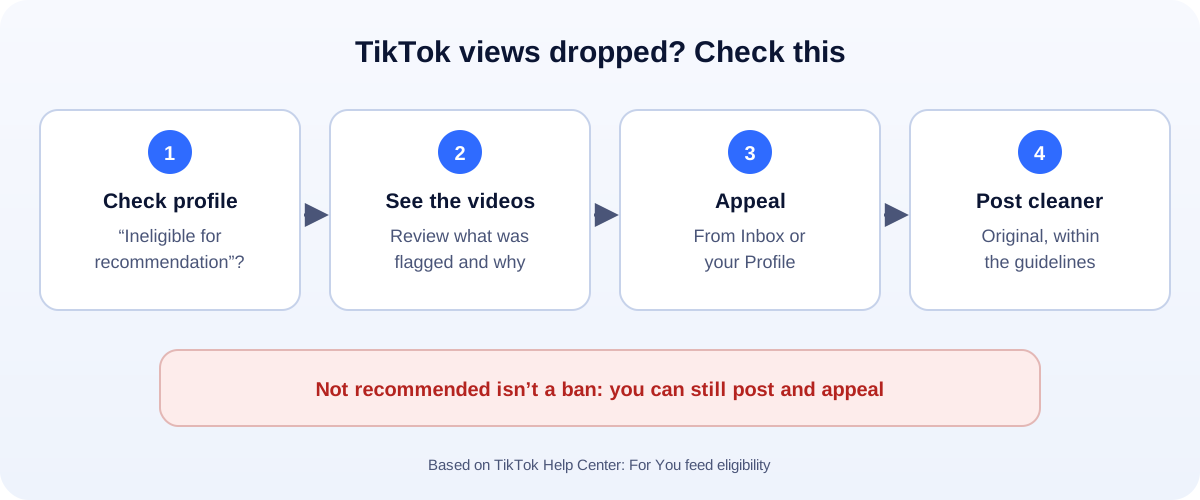
The 60-second version:
- Check your profile. Is there an “Ineligible for recommendation” notice under your username?
- Check your inbox for a notification about it.
- Tap it to see which videos were flagged, and why.
- Appeal if you think TikTok got it wrong.
- Post cleaner content while you wait. TikTok can restore you automatically.
Your videos used to get thousands of views. Now they’re stuck at 200. Everyone in the comments says “shadowban”. Here’s the honest version: what TikTok actually does, how to check it, and how to fix it.
What people call a “TikTok shadowban”
TikTok doesn’t use the word. But it does decide which content is suitable for the For You feed, the main way new people find you.
TikTok says: if you repeatedly post content that isn’t suitable for the For You feed, your account and posts won’t appear there and will be harder to find in search.
To you, that looks exactly like a shadowban. Views drop, and new followers stop coming.
How to check (free and official)
Skip the “shadowban checker” sites. They can’t see inside TikTok. Check these instead:
- Your profile. Look for an “Ineligible for recommendation” notice below your username.
- Your inbox. TikTok sends a notification when your account becomes ineligible.
- Account status. It shows your violations, and you can reach it from your inbox notifications. Our TikTok ban guide explains it.
- Single videos. You may also see a “not eligible for For You feed” label on one video, even when your account is fine.
How to appeal
TikTok gives you two ways.
From your inbox:
- Tap Inbox.
- Open the notification saying your account is ineligible for recommendation.
- Tap View more and look at the flagged videos.
- Tap Appeal at the top.
From your profile:
- Tap Profile.
- Tap the Ineligible for recommendation notice below your username.
- Look at the flagged videos.
- Tap Appeal at the top.
Appeal once, and be honest. If a video really did cross the line, delete it rather than appealing it.
What makes videos “not suitable”
TikTok’s guidelines explain what isn’t recommended. Common problems for business and creator accounts include:
- Reposted content from other creators, or clips you don’t have the rights to.
- Dangerous stunts or challenges.
- Misleading claims, like “guaranteed” income or health promises.
- Suggestive content, even if it’s allowed on the app.
- Spammy behaviour: follow-for-follow, bought views, or the same video posted again and again.
How to fix it
- Review every flagged video. Delete the ones that clearly break the rules.
- Appeal the mistakes. Only the ones you honestly think are fine.
- Keep posting good content. TikTok says it may restore your account automatically, depending on how much of your content isn’t suitable.
- Don’t delete your whole account or start a new one. That throws away your followers and history.
It might not be a shadowban
Views go up and down for lots of normal reasons:
- A weak first two seconds. If people swipe away fast, TikTok shows the video to fewer people.
- Posting less often, or at odd times.
- A big change in content. Your audience followed you for one thing.
- Seasonal dips.
Compare your engagement rate, not just views. Our free engagement rate calculator does the maths.
Protect your account
- Read the Community Guidelines once. It takes 20 minutes.
- Make original videos. Film your own product, your own team, your own process.
- Don’t buy views or followers.
- Turn on two-step verification, so nobody else can post on your account.
- Have a backup channel. A website, a Google Business Profile and a WhatsApp link. Our free WhatsApp link generator makes one in seconds.
Also on Instagram? Read how to check for an Instagram shadowban. It works in a similar way.
How UMA can help
We plan and make short-form video for small businesses, keep accounts in good standing, and track what actually grows reach. We work remotely with U.S. small businesses and others worldwide. See our social media marketing service or get in touch.
Only TikTok decides what it recommends. This guide is general information based on the TikTok Help Center.