Short answer: when someone searches “accountant near me” or “best restaurant in Bahria Town”, Google often shows a map with three businesses near the top of the page, above the normal results. Which three depends on relevance, distance and prominence. You cannot change distance, and you cannot pay Google for a better position, but you can do a great deal about the other two. This checklist covers the 15 steps that matter, all within Google’s own rules.
How Google ranks local businesses
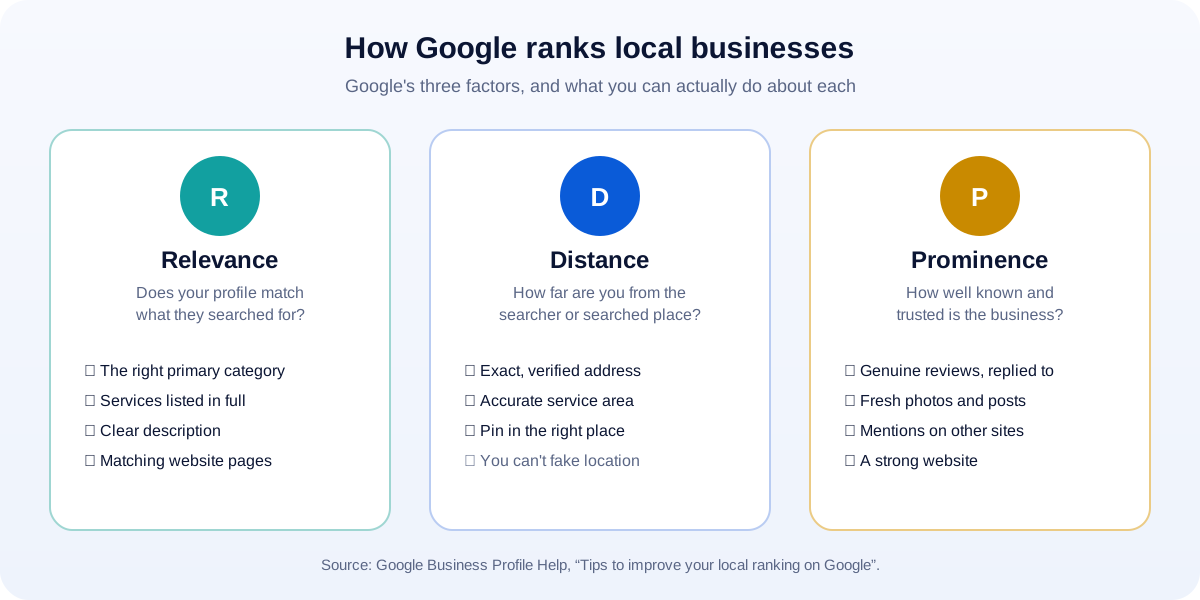
Google explains local ranking with three factors (Google Business Profile Help):
- Relevance: “how well a Business Profile matches what someone is searching for.”
- Distance: how far each result is from the searcher, or from the location mentioned in the search.
- Prominence: “how well-known a business is.” Reviews, ratings and what other websites say about you all feed into this.
And one line every business owner should know: “There’s no way to request or pay for a better local ranking on Google.” Anyone selling “guaranteed Google Maps rankings” is selling something Google itself says does not exist.
The 15-step checklist
Part 1: Get the basics right
1. Claim and verify your profile. Search for your business on Google Maps. If it exists, claim it; if not, create it at business.google.com. Verification is required before most changes go live.
2. Use your real business name, and nothing else. Google’s guidelines say your name “should reflect your business’s real-world name,” and that adding extra words “isn’t permitted, and could result in the suspension of your Business Profile.” (Google guidelines) “UMA Tech & Marketing” is fine; “UMA Tech & Marketing – Best SEO Agency Rawalpindi” is not.
3. Choose the right primary category. This is one of the strongest relevance signals. Google advises using “as few categories as possible” and choosing ones that complete the sentence “This business IS a…”. Pick the most specific one that fits (for example, “Dental clinic” rather than “Health”).
4. Get the address and service area exactly right. Use your real, permanent location; Google does not accept P.O. boxes or virtual offices. If you visit customers rather than receive them (plumbers, cleaners, many agencies), set a service area. Check the map pin sits on your actual building.
5. Keep hours accurate, including holidays. Wrong hours are one of the fastest ways to lose a customer’s trust. Add special hours for Eid, Ramadan timings, national holidays and any closures.
6. Use one phone number and website, everywhere. Your name, address and phone number should be written exactly the same way on your profile, website, Facebook page and directory listings.
Part 2: Tell Google (and customers) what you do
7. List every service or product. Add each service with a short description. If you sell products, add them with photos and prices where it makes sense. Each item is another chance to match a search.
8. Write a description for customers, not for robots. In plain language: what you do, who you help, where you work, and what makes you different. Mention your main services and area naturally; do not stuff keywords.
9. Add real photos, and keep adding them. Google recommends adding photos and videos. Show your storefront (so people can find you), the inside, your team at work and your products. Real photos beat stock images every time.
10. Link to a matching page on your website. If your profile says “Dental clinic in Bahria Town Phase 7”, your website should have a page that clearly talks about that service in that area. The profile and the page back each other up.
Part 3: Build prominence
11. Ask every happy customer for a review, the right way. Send a direct review link after a successful job, by WhatsApp or email. Ask everyone, not just the customers you expect to be happy.
12. Never buy or trade for reviews. Google prohibits reviews “paid for, directly or in kind” and forbids offering “payment, discounts, free goods and/or services in exchange for posting any review.” It also says businesses should not “require or pressure users” to leave reviews. (Google policy) Fake or incentivised reviews can be removed, and can put your profile at risk.
13. Reply to every review, good and bad. Google puts it simply: “Respond to customer reviews, it shows that you value their feedback.” Thank people by name; for complaints, stay calm, apologise where it’s fair, and offer to fix it offline.
14. Post updates regularly. Offers, new services, events and before-and-after photos show customers (and Google) that the business is active.
15. Earn mentions beyond Google. List your business on reputable local directories and industry associations, get featured in local news or community pages, and partner with complementary businesses. What the wider web says about you feeds into prominence, and into AI answers too (see our guide to getting found in AI search).
Common mistakes that hold businesses back
- Keyword-stuffed names that risk suspension.
- Two or more profiles for the same location, which confuses Google and splits your reviews.
- A website that doesn’t match the profile’s name, address or services.
- Unanswered reviews, especially negative ones sitting there for months.
- Old photos and wrong hours that make the business look closed.
How to know it’s working
Your Business Profile shows Performance figures: how many people found you, and how many called, asked for directions or visited your website from the profile. Check it monthly, and watch whether calls and direction requests grow as your reviews and photos build up. In your website analytics, visits from Google Maps usually appear as organic or referral traffic from Google.
How UMA can help
Local SEO is part of our SEO service. We set up and optimise Business Profiles, build website pages that match them, write service and area content, and put a simple, honest review routine in place for your team.
If you would like a quick check of your current profile, send us your business name and area. We will tell you the three changes most likely to bring more calls, whether or not you hire us.
Sources
- Google Business Profile Help: Tips to improve your local ranking on Google
- Google Business Profile Help: Guidelines for representing your business on Google
- Google Maps User Contributed Content Policy: Fake engagement