The 60-second version:
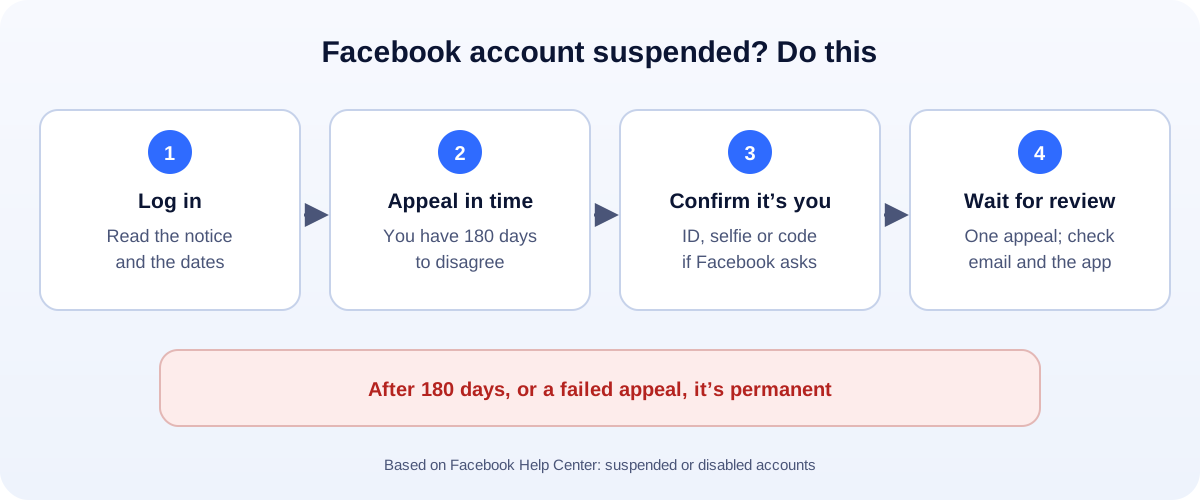
- Log in to Facebook. You’ll see a notice explaining the suspension.
- Read it, and screenshot it. Note the reason and the dates.
- Appeal from that notice. Facebook gives you 180 days.
- Confirm your identity if asked, for example with an ID or a selfie video.
- Don’t make a new account. And don’t wait until day 179.
Getting locked out of Facebook can cut you off from friends, groups, your Page and your ads in one go. The notice is often short, and it’s easy to panic. Here’s what’s actually going on, based on Facebook’s own help pages.
Suspended vs disabled: what Facebook means
- Suspended means Facebook thinks the account, or activity on it, may not follow its Community Standards. You can appeal within 180 days.
- Disabled means it’s permanent. Facebook says this happens if you don’t appeal within 180 days, or your appeal isn’t successful. After that, you can’t request another review.
One more thing: Facebook says it may disable an account without suspending it first for severe or time-sensitive violations.
While an account is suspended or disabled, other people can’t see it, and you can’t use it.
Step 1: Log in and read the notice
Log in on the app or at facebook.com. The notice usually tells you:
- That the account is suspended, and roughly why.
- How long you have to disagree.
- What you can do, usually a button to appeal or disagree with the decision.
Take a screenshot. Write down the date. Then act early, while you have the most options.
Step 2: Appeal the right way
Tap the option to disagree with the decision or appeal, and follow the steps.
- Confirm your identity if asked. Facebook may ask for a photo of your ID, a code, or a video selfie.
- Be short and honest if there’s a text box: “This is my personal account. I use my real name. I believe this was a mistake.” If you were hacked, say so.
- Appeal once. Sending the same appeal many times doesn’t help.
Then check your email and the app for the result.
“For no reason”: the common causes
There’s almost always a trigger, even if the notice is vague. The usual ones:
- Account integrity. Meta’s rules on fake or duplicate accounts, pretending to be someone else, buying or selling accounts, or making accounts to get around a ban.
- A hacked account. Hackers post scams from stolen accounts, which can get them suspended. See what to do if your Facebook was hacked.
- Spammy behaviour. Lots of friend requests, group posts or messages in a short time.
- Content that breaks the Community Standards.
- A name that doesn’t look real, or details that don’t match.
Mentions Instagram? If your Facebook and Instagram are linked in Accounts Center, the notice may refer to your Instagram account. Appeal from the notice anyway. If Instagram was suspended too, read our guide to a suspended Instagram account.
While you wait
- Don’t create a new account. Accounts made to get around a suspension can break Meta’s rules too.
- Secure your email. Change its password and turn on two-factor login, in case the suspension started with a hack.
- Business owner? Ask another admin to keep your Page running. If you’re the only admin, that’s a lesson for next time.
If your appeal fails
If Facebook rejects the appeal, or the 180 days pass, the account is permanently disabled. Facebook says you won’t be able to request another review.
It’s painful, but you can rebuild:
- Make sure customers can still find you on your website, Google Business Profile and WhatsApp.
- Give customers a direct way to message you. Our free WhatsApp link generator makes a link and QR code.
- Build channels you own, like an email list. They can’t be switched off by a platform.
How to avoid a suspension next time
- Use your real name and accurate details.
- One personal account per person. No duplicates.
- Two-factor login on Facebook and your email.
- Don’t buy or borrow accounts, and don’t use “aged” accounts for ads.
- Slow down. Mass friend requests and copy-paste messages look like spam.
- For businesses, add at least two trusted admins to your Page through your Business portfolio.
How UMA can help
We set up and manage Facebook Pages, Business portfolios and ad accounts for small businesses, with proper admin access so one locked profile doesn’t stop the business. We work remotely with U.S. small businesses and others worldwide. See our social media marketing service or get in touch.
Only Meta decides whether an account is restored. This guide is general information based on the Facebook Help Center and Meta’s Community Standards.