The 60-second version:
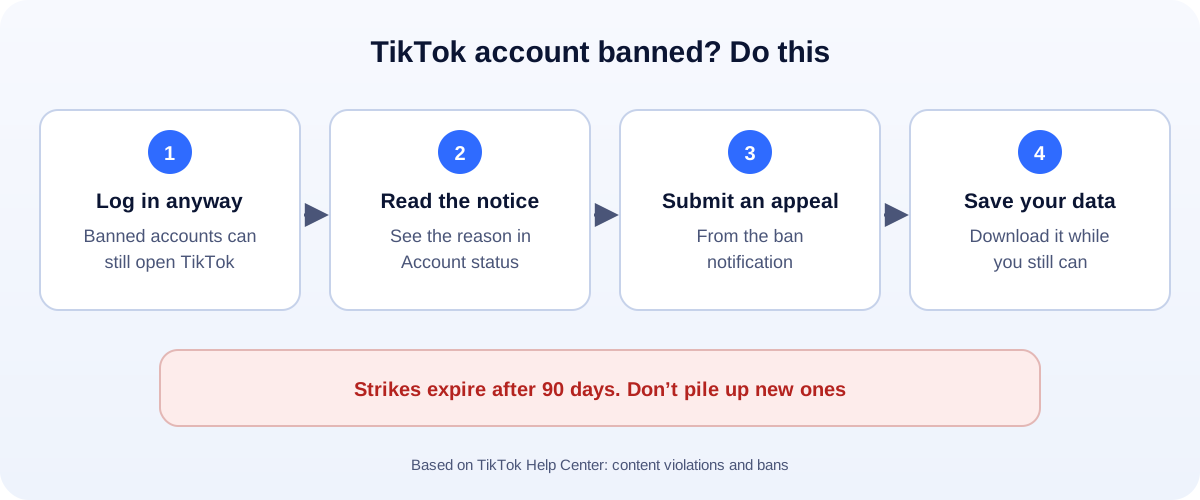
- Log in anyway. TikTok says banned accounts can still log in to appeal.
- Read the notice. Then check Account status for the violation.
- Submit an appeal from the ban notification, if you think it’s a mistake.
- Download your data while you still can.
- Learn the strike rules. Strikes expire after 90 days.
For many creators and small businesses, TikTok is the biggest source of new eyes. A ban can wipe out months of work in a second. Here’s how TikTok bans actually work, and what you can do about one.
How TikTok bans work
TikTok’s Help Center explains it in fairly plain terms:
- Breaking a rule removes the content and adds a strike to your account.
- Strikes expire after 90 days. After that, they don’t count toward a permanent ban.
- Reach the strike limit for a policy (such as harassment) or a feature (such as comments or LIVE), and the account can be permanently banned.
- Some violations mean an instant ban, on the first strike. These are the most severe ones, like threats of violence.
- Accounts can also be banned for being under the minimum age, or for impersonating someone.
Not every problem is a full ban. TikTok can also restrict a single feature, like direct messages or LIVE, for a while.
Step 1: Log in and read the notice
Don’t delete the app, and don’t make a new account yet. Log in to the banned one.
TikTok says: if your account is banned, you can still log in to submit an appeal and download your personal data.
Read the notice carefully. Then check Account status, which shows your violations. You can reach it from the notification in your inbox.
Take screenshots. Write down which rule TikTok says you broke.
Step 2: Submit an appeal
Open the ban notification and follow the steps to appeal.
- Keep it short and honest. “This is my business account. I believe this video was removed by mistake. It shows our product and doesn’t break the rules.”
- Appeal once. Then wait.
- Track it in Safety Center inside the app.
If TikTok approves the appeal, the account comes back and the strike is removed.
Be careful with “TikTok appeal links” sent by DM or found on random websites. Appeal from inside the app.
Step 3: Download your data
Even if you’re sure you’ll win, save your data now. That includes your videos, which you may want to post elsewhere.
TikTok deletes personal data under its retention rules. After that, a banned account is no longer available, even to you.
Common reasons for a “no reason” ban
The notice often feels vague. These are the usual causes:
- Several strikes in a short time, often in one area like comments.
- Impersonation. A name or photo that looks like a brand or a public figure.
- Being under the minimum age, or TikTok thinking you might be.
- Reposting other people’s content without permission.
- Spam: mass follows, copy-paste comments, or links that look suspicious.
- A hacked account being used for spam.
Banned from messages, LIVE or comments?
This is a feature restriction, not a full ban. You can often still post.
- Read the notification. It usually says which feature and for how long.
- Wait it out if it’s temporary.
- Appeal if you think it was a mistake.
- Look at what triggered it. Repeating it can lead to a full ban.
How to keep your account safe
- Read the Community Guidelines once. Really. It takes 20 minutes and saves months of work.
- Space out your strikes. They expire after 90 days, so one mistake isn’t the end. A pile of them is.
- Use original content, or content you have the right to use.
- Don’t buy followers or use automation tools.
- Turn on two-step verification, so a hacker can’t get you banned.
- Use a clear, honest account name that doesn’t look like someone else’s brand.
Don’t put your whole business on one app
A TikTok ban is a good reminder: build at least one channel you own.
- A website with your products, prices and contact details.
- A Google Business Profile, so people find you on Maps.
- A WhatsApp chat link in every bio. Our free WhatsApp link generator makes one in seconds.
- Track what works across platforms with our engagement rate calculator.
How UMA can help
We plan and manage short-video content for small businesses, and help them build channels that one ban can’t switch off. We work remotely with U.S. small businesses and others worldwide. See our social media marketing service or get in touch.
Only TikTok decides whether an account is restored. This guide is general information based on the TikTok Help Center.