The 60-second version:
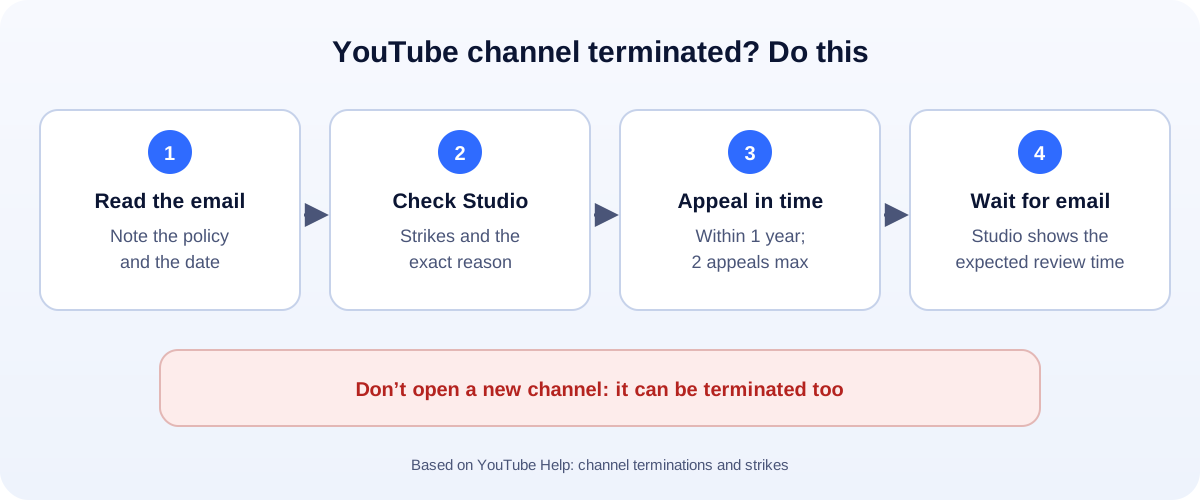
- Read YouTube’s email. It names the policy and the date.
- Check YouTube Studio for the reason and any strikes.
- Appeal from Studio (or YouTube’s appeal form). You have up to 1 year, and 2 appeals.
- Wait for the email. Studio shows the expected review time.
- Don’t start a new channel. YouTube can terminate that too.
A terminated channel can wipe out years of videos, subscribers and income overnight. It feels final. Sometimes it isn’t. Here’s what YouTube’s own rules say, and how to appeal without making things worse.
Why YouTube terminates channels
YouTube’s help page lists three main reasons:
- Repeated violations of the Community Guidelines or Terms of Service.
- A single case of severe abuse, such as predatory behaviour, spam or pornography.
- A channel dedicated to breaking a policy, like hate speech, harassment or impersonation.
That second one is why some people say they were terminated “without warning”. For severe cases, YouTube can skip the usual strikes.
How strikes lead to termination
Most terminations come from strikes. Here’s how they work:
- First problem: a warning. You can take a short policy training so the warning expires after 90 days.
- First strike: no uploads, scheduling or new playlists for one week.
- Second strike within 90 days: the same limits for two weeks.
- Third strike within 90 days: the channel may be permanently removed.
Two details trip people up:
- Strikes last 90 days. After that, they drop off.
- Deleting the video doesn’t remove the strike. Appeal it instead, if you think it’s wrong.
Copyright strikes are a separate system. They come from copyright claims, not the Community Guidelines. Three of those can also end a channel.
“Terminated for circumvention”
This one confuses a lot of people. It means YouTube thinks a channel was used to get around a restriction. For example:
- Uploading on a second channel while the first had a strike.
- Making a new channel after an earlier one was terminated.
- Letting someone who was terminated run your channel.
After a termination, YouTube says you can’t use, own or create any other YouTube channels. So a “fresh start” channel usually ends the same way.
How to appeal
- Sign in to YouTube Studio with the Google account that owned the channel.
- Follow the appeal steps shown for the terminated channel. You can also use YouTube’s appeal form.
- Explain clearly and politely. Which video or policy do you think was judged wrongly, and why? Keep it short.
- Submit and wait. YouTube Studio shows your appeal confirmation and the expected review time. The result comes by email.
Timing rules from YouTube:
- Up to 1 year from the termination date to appeal.
- Two appeals in that year. Use the first one well.
What to write
A good appeal is short, calm and specific:
“My channel teaches home repairs. I believe the video ‘Fixing a leaking tap’ was flagged by mistake. It doesn’t show anything dangerous, and it follows the Community Guidelines. I’ve read the policy and I’d like the termination reviewed.”
Skip the anger, the threats and the copy-pasted templates. A real person may read it.
While you wait
- Don’t upload anywhere else on YouTube. That can count as circumvention.
- Back up your work. Keep copies of your videos on your own drive.
- Tell your audience on your other channels and your website where to find you.
- Secure your Google account. If you think it was hacked, fix that first. Our Gmail account recovery guide can help.
If the appeal is rejected
If both appeals fail, the termination stands. It’s hard, but you can still protect your business:
- Own your audience. An email list and a website can’t be switched off by one platform.
- Grow on other platforms that suit your content. Read the rules first: see our guides to TikTok bans and Instagram suspensions.
- Track what works with our free engagement rate calculator.
How to protect your channel
- Read the Community Guidelines once, start to finish.
- Take strikes seriously. Wait out the 90 days before posting anything borderline.
- Use only content you own or have permission to use.
- Turn on 2-Step Verification on your Google account.
- Give your team access through YouTube’s channel permissions, not your password.
How UMA can help
We plan and manage video content for small businesses, and help them build channels they own alongside YouTube. We work remotely with U.S. small businesses and others worldwide. See our content marketing service or get in touch.
Only YouTube decides whether a channel is restored. This guide is general information based on YouTube Help.