The 60-second version:
- Amazon main image: pure white background (RGB 255, 255, 255), no text or logos.
- Size: at least 1000 px on the longest side for Amazon. Most sellers go 1600 to 2000 px.
- Fill the frame: the product should take up about 85% of the image.
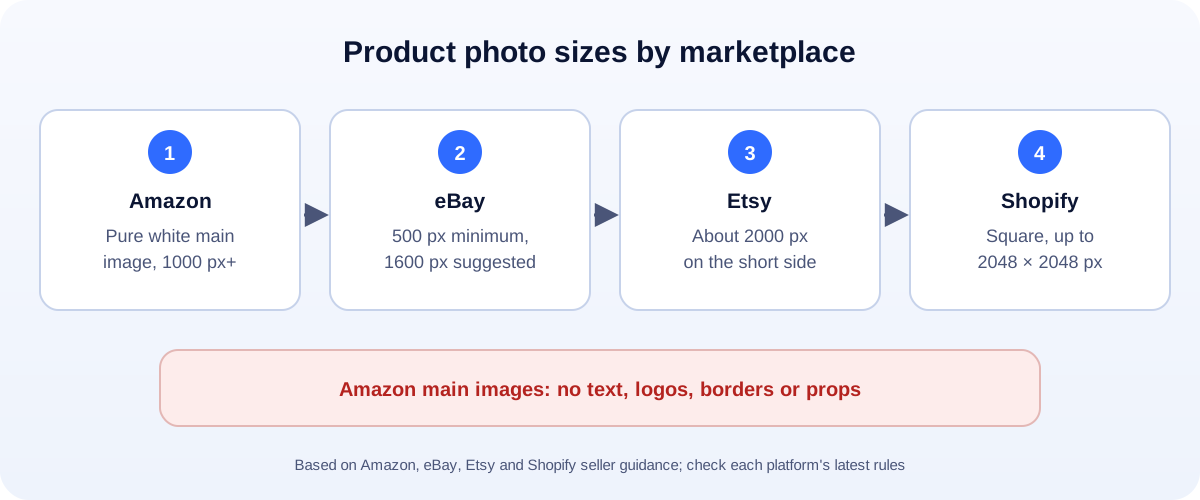
- eBay: 500 px minimum, 1600 px suggested. Etsy: about 2000 px. Shopify: square, up to 2048 px.
- No studio? Shoot on white paper, then use our free background remover and pick White.
A clean white background makes products look professional, and on Amazon it isn’t optional. Here’s what each platform asks for, and how to get there with a phone and a free tool.
Amazon: the strictest rules
Amazon’s product image requirements for the main image include:
- A pure white background, RGB 255, 255, 255. Not off-white, not light grey.
- At least 1000 pixels on the longest side, so the zoom works.
- The product fills about 85% of the frame.
- The whole product is visible, not cut off by the edge.
- No text, logos, borders, colour blocks or watermarks.
- No packaging, unless the box is an important part of the product.
Your other images (up to the limit for your category) can show the product in use, close-ups, size charts and features. That’s where lifestyle shots belong.
Amazon updates its rules from time to time, so check the image requirements in Seller Central before a big photo shoot.
eBay, Etsy and Shopify
| Platform | Size | Background |
|---|---|---|
| eBay | At least 500 px on the longest side; 1600 px or more suggested | White or plain backgrounds work best |
| Etsy | Around 2000 px on the shortest side | Any clean background; white helps thumbnails look consistent |
| Shopify | Square, up to 2048 × 2048 px | Your choice, but keep every product the same |
For your own store, consistency matters more than the colour. Pick one background and use it for every product.
How to get a white background without a studio
You don’t need expensive gear. You need soft light and a free tool.
1. Shoot it right
- Use daylight from a window, not direct sun. Overcast days are perfect.
- Put the product on white paper or card, curved up the wall behind it (a “sweep”).
- Shoot from a little further back and zoom in a bit. That reduces distortion.
- Fill the frame and keep the whole product in shot.
- Turn off the flash. It causes harsh reflections and shadows.
2. Replace the background
- Open our free background remover and choose Products and objects.
- Add your photo.
- Pick White.
- Download a JPG.
The background becomes true white (RGB 255, 255, 255), which is exactly what Amazon asks for.
3. Size and compress it
- Make it square for Shopify and most marketplaces with our social media image resizer, or crop it in your photo app.
- Shrink the file with our image compressor. Fast-loading photos help your store pages load faster.
Common mistakes
- Off-white or grey backgrounds on the Amazon main image.
- Tiny products floating in a big white space. Fill the frame.
- Shadows cut off at strange angles. Either keep a soft natural shadow, or remove it fully.
- Text and badges like “Best seller” on the main image.
- Different backgrounds for every product in your own store.
Do it once, use it everywhere
The same clean photo works on your website, Google Merchant Center, Facebook and Instagram shops, and ads. Get it right once and you save time on every channel.
Want a quick guide to the free cut-out options on your phone or computer? Read how to remove the background from a photo for free.
How UMA can help
We set up online stores, product photos and listings for small businesses, and make sure images load fast. We work remotely with U.S. small businesses and others worldwide. See our website design service or get in touch.
Platform rules are summarised from Amazon, eBay, Etsy and Shopify seller guidance and can change. Always check the current rules for your category.