The 60-second version:
- Fastest on any device: our free AI background remover. No sign-up, and your photo isn’t uploaded.
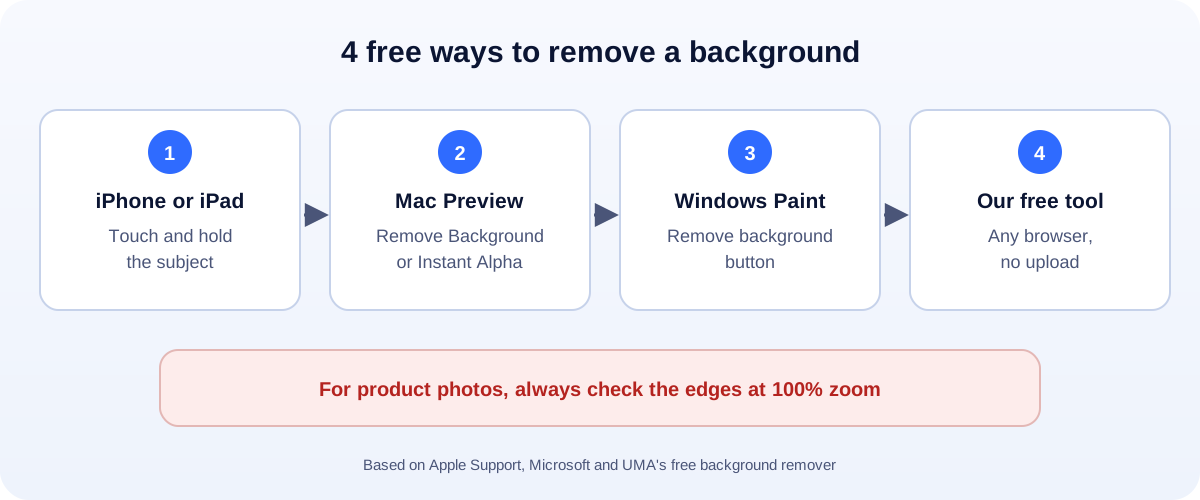
- iPhone or iPad: touch and hold the subject in Photos, then copy or share it.
- Mac: open the photo in Preview and click Remove Background.
- Windows 11: open it in Paint and click Remove background.
- Save as PNG to keep the transparent background.
You need a clean photo of a product, a headshot for LinkedIn, or a logo without that white box around it. Good news: you probably don’t need to pay for anything. Here are the free ways, from quickest to most hands-on.
Option 1: A free AI tool in your browser
Our background remover works on phones and computers:
- Choose People (portraits, selfies) or Products and objects.
- Pick a photo, or drag it in.
- Wait a few seconds. The first time, your browser downloads the AI model once.
- Choose transparent, white, or any colour.
- Download a PNG (keeps transparency) or JPG (solid background).
Everything runs on your device. The photo never goes to us or anyone else.
Option 2: iPhone and iPad
Apple calls this lifting a subject from the background:
- Open the photo in Photos.
- Touch and hold the person, pet or object until a glowing outline appears.
- Choose Copy, Share or Add Sticker.
You can paste the cut-out straight into a message, a document or another app. It also works in Safari and Quick Look.
Option 3: Mac (Preview)
Preview, the app that opens images on a Mac, has two options:
- Remove Background: one click. If Preview asks to convert the file to PNG, say yes (or click Cancel to keep a copy of the original).
- Instant Alpha: drag over part of the background, and Preview selects similar colours nearby. Press Delete. This is great for logos on a flat colour.
Option 4: Windows 11 (Paint)
The built-in Paint app has a Remove background button:
- Open the image in Paint.
- Click Remove background in the toolbar.
- To work on one part only, draw a rectangle selection first.
- Save as PNG.
Option 5: PowerPoint (and Word)
Already making slides? Select the picture, then Picture Format > Remove Background. PowerPoint colours the parts it will remove in magenta. Use Mark Areas to Keep or Mark Areas to Remove to fix mistakes.
Using Google Slides or Canva? Remove the background first with one of the options above, then insert the PNG.
Which option should you use?
| You need… | Best choice |
|---|---|
| A quick cut-out on your phone | iPhone Photos, or our tool in the browser |
| Product photos for a store | Our tool in Products mode, then a white background |
| A logo on a flat colour | Mac Preview’s Instant Alpha, or our tool |
| A picture inside a presentation | PowerPoint’s Remove Background |
Tips for a clean result
- Contrast matters. A dark product on a light wall cuts out much better than grey on grey.
- Light it evenly. Strong shadows can get mistaken for the subject.
- Fill the frame. Shoot close, then add space back later.
- Check the edges at 100% zoom, especially hair, fur and see-through parts.
- Keep the original. You can always try again.
What to do next with your cut-out
- Selling online? Read our guide to white-background product photos for Amazon, eBay, Etsy and Shopify.
- Got a logo? See how to make a logo background transparent.
- Posting on social? Get the size right with our social media image resizer.
- Uploading to your website? Shrink the file with our image compressor.
How UMA can help
We design product images, social posts and brand graphics for small businesses, and build websites that load them fast. We work remotely with U.S. small businesses and others worldwide. See our branding and graphic design service or get in touch.
Steps for iPhone, Mac and Windows are based on Apple Support and Microsoft’s documentation. Menus can change between software versions.