
The 60-second version:
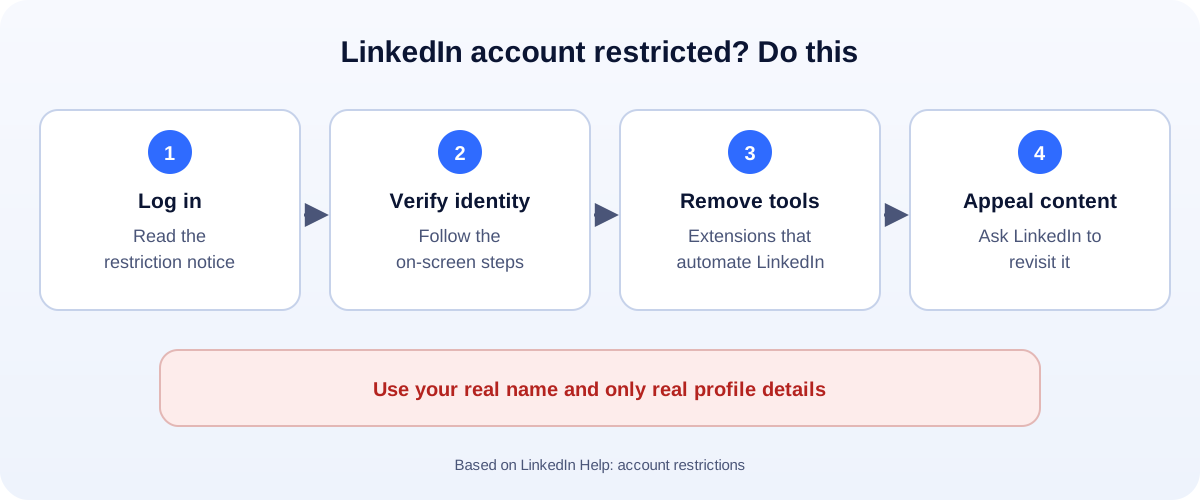
- Log in and read the restriction notice.
- Follow the on-screen steps. Often that means verifying your identity with a government ID.
- Remove automation tools and browser extensions that touch LinkedIn.
- Content issue? Use the prompts to ask LinkedIn to revisit the decision.
- Use your real name and accurate details from now on.
For many professionals and B2B businesses, LinkedIn is where the leads, jobs and partnerships are. A restricted account is a real problem. Here’s what LinkedIn’s help pages say about why it happens, and how to get back in.
Why LinkedIn restricts accounts
LinkedIn’s help center lists these causes:
- Identity: LinkedIn requires you to use your true identity and accurate information. Fake names, fake jobs or company pages pretending to be people can lead to restrictions.
- Profile violations: a name, photo, background image, experience or education section that breaks the rules. Repeated violations lead to restrictions.
- Automation tools: third-party software or browser extensions that scrape data, change how LinkedIn looks, or automate actions like connection requests or messages.
- Content: posts, comments or messages that break the Professional Community Policies. LinkedIn says some violations can mean permanent restriction after just one.
- A compromised account: if LinkedIn sees signs someone else took over your account, it may restrict it to protect you.
Step 1: Verify your identity
If LinkedIn asks you to verify who you are:
- Log in and follow the on-screen steps.
- You’ll usually be asked to upload a photo of a valid government ID (driver’s license, passport or ID card). LinkedIn uses identity verification partners for this.
- Make sure the name matches. The name on your profile should match your ID.
- Wait for the result by email.
Use good light and a clear, uncovered photo of the ID. Blurry photos are a common reason verification fails.
Step 2: Remove automation tools
This is the most common cause of “restricted for no reason” for sales and recruiting accounts.
- Uninstall browser extensions that send connection requests, view profiles or export data automatically.
- Disconnect “growth” or “lead gen” apps that log in to your account.
- Change your password if you ever gave it to one of these tools.
After you’re back in, do outreach by hand, at a normal pace. Personal messages also get better replies.
Step 3: Appeal content decisions
If a post or comment was removed and you think it follows the rules:
- Log in and follow the prompts to ask LinkedIn to revisit the decision.
- Explain briefly and politely why the content is fine.
- LinkedIn reviews it and tells you the outcome.
Hacked account?
If you didn’t make the changes on your account, it may have been taken over. Follow LinkedIn’s steps to recover it, then:
- Change your password and the password of the email linked to LinkedIn.
- Turn on two-step verification.
- Check your email and phone in settings.
- Tell your contacts to ignore strange messages sent from your account.
How to stay out of “LinkedIn jail”
- Real name, real photo, real job titles. No keywords in your name field.
- No automation. No bots, no auto-connect tools, no scraping extensions.
- Go easy on connection requests. Send them to people you actually have a reason to connect with, with a short note.
- Post genuinely useful content, not engagement bait.
- Two-step verification on LinkedIn and your email.
Using LinkedIn for business
Build your company Page alongside your personal profile, add your team as admins, and send leads to your own website, so one restricted login doesn’t stop the business. Writing better posts is often the fastest way to get noticed: see our content marketing service.
More platforms: all our account recovery guides, including Facebook and Instagram.
How UMA can help
We help professionals and B2B companies build LinkedIn profiles, company Pages and content that bring real leads, without risky tools. We work remotely with U.S. small businesses and others worldwide. See our social media marketing service or get in touch.
Only LinkedIn decides whether a restriction is lifted. This guide is general information based on LinkedIn Help.