The 60-second version:
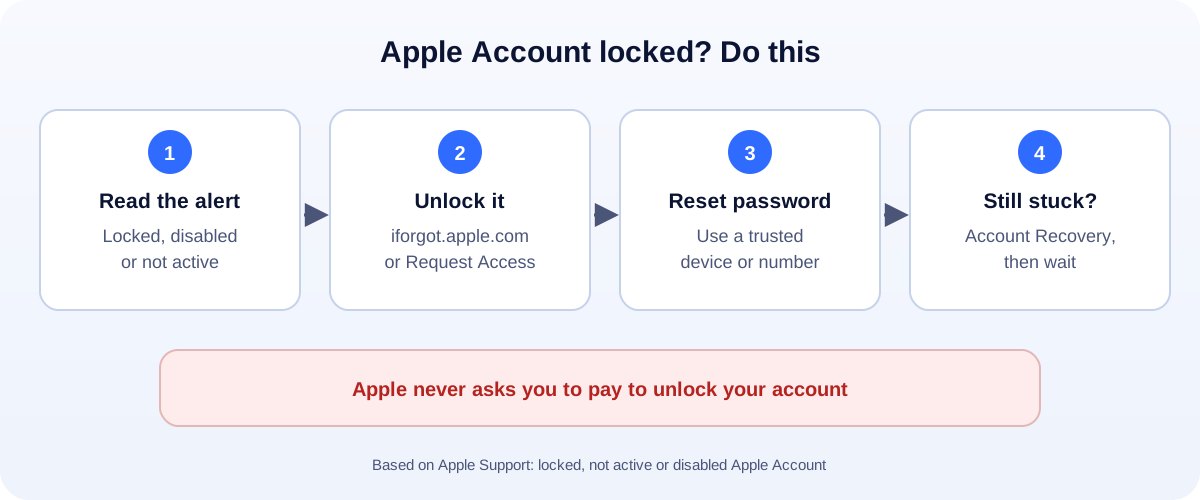
- Read the alert. It says locked, disabled or not active. Each has a different fix.
- See “Request Access”? Tap it. Or go to iforgot.apple.com/unlock.
- Disabled for security reasons? Reset your password on a device you’re already signed in to.
- No trusted device? Use iforgot.apple.com, or the Apple Support app on a friend’s iPhone.
- Still stuck? Start account recovery and be patient. It can take several days or more.
Your Apple Account (it used to be called Apple ID) runs your iCloud photos, App Store, iMessage and Find My. When it locks, a lot stops at once. Here’s what each message means and how to get back in, based on Apple Support.
What the messages mean
Apple shows a few different alerts:
- “This Apple Account has been locked for security reasons” or “disabled for security reasons.” Someone entered the password or account details wrong too many times. That can be you, or someone trying to get in.
- “This Apple Account is not active” or “locked.” Apple needs you to request access before you can use it again.
- “This Apple Account is locked and can’t be used.” The request to unlock was refused.
- “Your Media & Purchases account has been disabled.” Only App Store, iTunes and similar purchases are affected.
Fix 1: Locked or disabled for security reasons
This one usually clears with a password reset.
- On an iPhone or iPad you’re signed in to, change the password in Settings, under your name, in Sign-In & Security.
- On a Mac you’re signed in to, change it in System Settings, under your name.
- No device? Go to iforgot.apple.com and follow the steps. Apple says it will send you to a trusted device when it can.
Use a password you haven’t used anywhere else.
Fix 2: “Not active” or “locked”
- Tap Request Access if the alert shows it.
- Or open iforgot.apple.com/unlock in a browser and follow the steps.
- Have your details ready: the email or phone number for the account, and a trusted phone number.
No trusted device? Borrow one
You can reset your password from a friend’s or family member’s iPhone or iPad:
- Open the Apple Support app.
- Scroll to Support Tools and choose Reset Password.
- Pick Help Someone Else and follow the steps.
Apple says what you type isn’t stored on the borrowed device.
Account recovery: the last resort
If none of the above works, Apple offers account recovery. It’s built to keep strangers out, so it’s slow on purpose.
- It can take several days or more. Apple doesn’t give a fixed time.
- Don’t keep using the account in the meantime. If you started on the web, Apple suggests turning off your other Apple devices while you wait.
- Signing in or resetting on a trusted device cancels it. So only start it when you’re truly locked out.
“Locked and can’t be used”
If Apple refuses the request, it suggests creating a new Apple Account. If a locked device won’t let you past Activation Lock, and you have proof of purchase, you can start an Activation Lock support request with Apple.
Media & Purchases disabled
This only blocks buying and downloading. Tap Continue on the alert to ask Apple to reactivate it. Check that your payment method is up to date.
Scams to avoid
Locked accounts attract scammers:
- Texts or emails saying “Your Apple ID is locked, click here.” Go to iforgot.apple.com yourself instead of tapping links.
- Phone calls from “Apple Support” you didn’t ask for. Hang up.
- “Unlock services” that want money or gift cards. Apple doesn’t charge to unlock accounts.
How to avoid another lock
- Turn on two-factor authentication and keep your trusted phone number current.
- Add a recovery contact or a recovery key in Sign-In & Security.
- Use a password manager so you don’t guess wrong.
- Never share your Apple Account password, even with apps that promise free storage or followers.
Run a business on your iPhone?
If your phone is your shop, a locked account hurts. Keep a second way for customers to reach you, like a WhatsApp chat link or a Google Business Profile. Locked out of Gmail too? See our Gmail recovery guide. More help: all our account recovery guides.
How UMA can help
We build websites and apps for small businesses, and set up accounts so one lockout doesn’t stop sales. We work remotely with U.S. small businesses and others worldwide. See our app development service or get in touch.
Only Apple decides whether an account is unlocked. This guide is general information based on Apple Support.