The 60-second version:
- Use a familiar device. The phone or laptop you normally use for Facebook.
- Open Facebook and select Get started.
- Follow the steps. You may need a code, a photo of your ID or a video selfie.
- Code not arriving? Check spam. After several tries, wait a day.
- Once you’re in, change your password and turn on two-factor login.
“Your account has been locked.” It’s a scary message, but it’s usually Facebook protecting you, not punishing you. Here’s how to get back in, based on Facebook’s Help Center.
Why Facebook locks accounts
Facebook says it may lock your account for security if it sees unusual activity. Common triggers:
- A login from a new country or device, especially if your password leaked somewhere else.
- Someone trying your password again and again.
- Lots of friend requests or messages in a short time.
- Logging in through other apps that asked for your Facebook password.
You’ll usually get an email saying your account was locked, or see the message when you log in.
How to unlock it
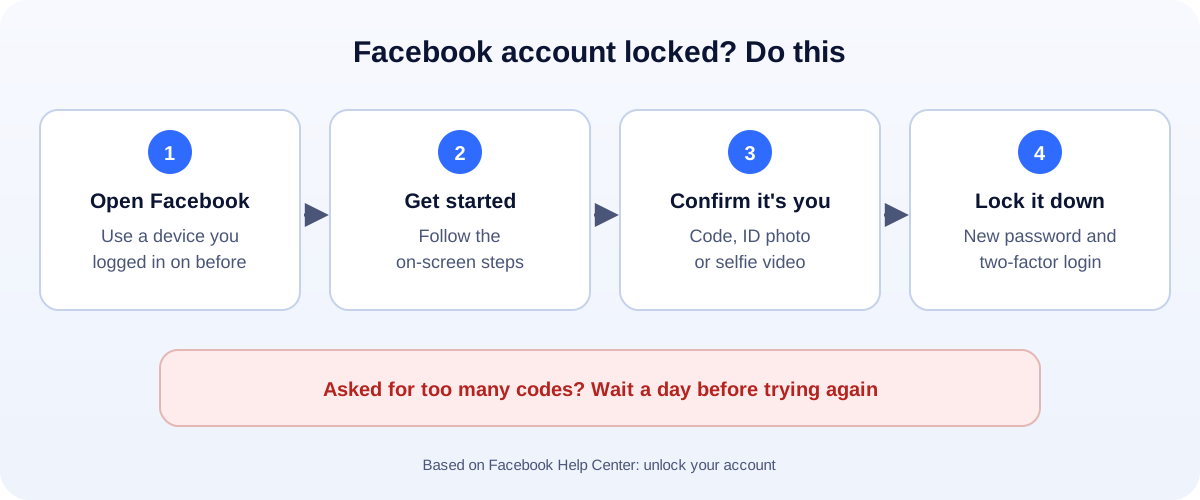
- Open Facebook in the app or at facebook.com. Use a device and Wi-Fi you’ve used before if you can.
- Select Get started on the lock message.
- Follow the on-screen steps. Facebook may ask you to:
- enter a code sent to your email or phone,
- upload a photo of your ID, or
- record a short video selfie.
- Set a new password when it asks.
Use the full Facebook app or a browser for this. If you see “confirm your identity”, Facebook’s ID check runs through its own screens and Help Center.
The code never arrives
This is the most common hold-up. Facebook’s own tips:
- Check the details. Is it the email or number that’s on the account?
- Look in spam, and in blocked or filtered texts.
- Check your phone. Signal, free storage, and whether your plan blocks short-code texts.
- Restart your phone.
- Asked for several codes already? Wait a day before trying again. More requests won’t speed it up.
Locked because you were hacked?
If you see posts, messages or a new email you didn’t add, someone else got in. Go to facebook.com/hacked on a device you’ve used before and follow the steps. Our hacked Facebook account guide walks through it.
Locked vs suspended vs disabled
- Locked: a security check. You clear it by proving it’s you.
- Suspended: Facebook thinks the account broke the rules. You appeal from the notice within 180 days.
- Disabled: permanent, after a failed appeal or no appeal.
If your screen mentions Community Standards, read our suspended or disabled Facebook account guide instead.
Scams to avoid
- “Facebook support numbers” in search results or comments. Facebook doesn’t run phone support for this.
- DMs offering to unlock your account for a fee. They want money, your login, or both.
- Look-alike emails with links. Go to facebook.com yourself instead.
After you’re back in
- New password you don’t use anywhere else.
- Turn on two-factor login, ideally with an authenticator app.
- Check where you’re logged in in Accounts Center under Password and security, and log out anything you don’t know.
- Remove old apps connected to Facebook that you no longer use.
Run a Page or ads?
A locked profile can lock you out of your business Page and ads too. Add a second trusted admin to your Page and Business Manager, so one lock doesn’t stop everything. If your ads were hit, see our guide to a disabled Facebook ad account. More help: all our account recovery guides.
How UMA can help
We run Facebook and Instagram for small businesses, with secure admin setups and backup access. We work remotely with U.S. small businesses and others worldwide. See our social media marketing service or get in touch.
Only Meta decides whether an account is unlocked. This guide is general information based on the Facebook Help Center.