The 60-second version:
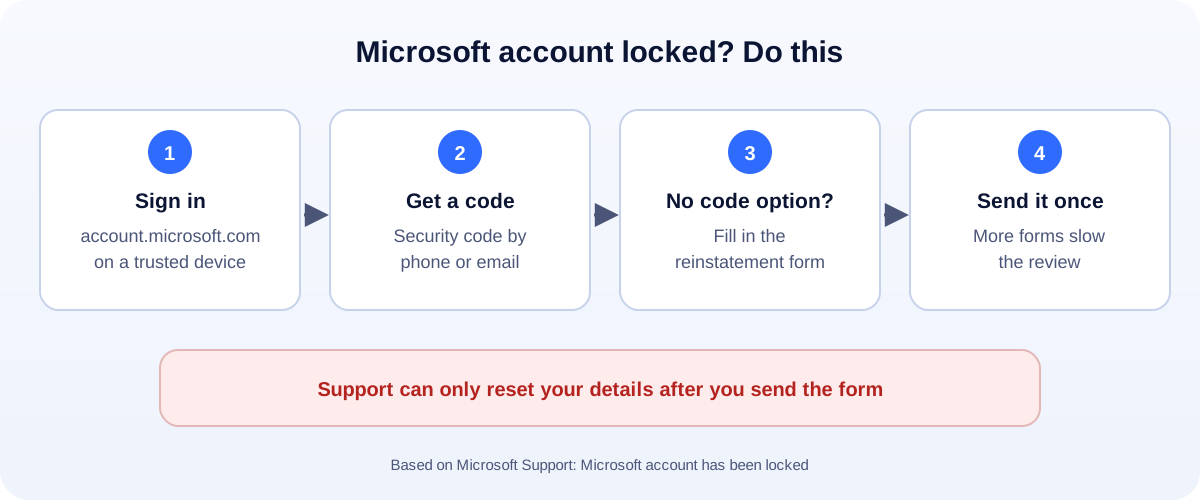
- Sign in at account.microsoft.com. Use a device you’ve used before.
- Follow the steps to get a security code, and enter it.
- No code option? Use the link in the window to send the reinstatement form.
- Send it once. Microsoft says extra requests slow things down.
- Once you’re in, change your password and check your security info.
One Microsoft account runs Outlook and Hotmail email, OneDrive, Xbox, Teams, Skype and Windows sign-in. When it locks, a lot goes dark. Here’s how to unlock it, based on Microsoft Support.
Why Microsoft locks accounts
Microsoft locks accounts when activity might break its Terms of Use, or looks unusual. Common reasons:
- Spam, like sending lots of unsolicited promotional emails.
- Phishing or malware sent from your account, often because it was hacked.
- Bots or many accounts created to get around rules.
- Too many wrong passwords or a sign-in from somewhere new.
Unlock with a security code
This is the usual fix.
- Go to account.microsoft.com and sign in.
- Microsoft shows the lock and offers to send a security code.
- Enter the code and follow the steps. You may need to set a new password.
Tips if the code is a problem:
- Codes expire. Use it straight away.
- Enter the code from the message body, not other numbers in the text.
- Check junk mail. Real codes come from @accountprotection.microsoft.com.
- “Usage limit exceeded”? The number was used too many times. Wait, or try another method.
- Try switching between Wi-Fi and mobile data.
Can’t sign in at all? Use Microsoft’s sign-in helper from the sign-in page.
No code option? Use the reinstatement form
Sometimes the window doesn’t offer a code, or skips the “prove you’re human” step. Microsoft says that means the account was locked for suspicious activity or a Terms of Use issue.
- Select the link in that window to open the account reinstatement form.
- Fill it in honestly and completely. Use an email address you can check.
- Wait for an email from a Microsoft Online Safety agent.
- Send it only once. Microsoft says more requests slow the response.
Microsoft also says agents can only send password reset links or change account details after you send this form.
Code never arrives?
If you’re stuck in a loop:
- Wait. Repeated tries can reset a time lock. Give it 24 hours, then longer if needed.
- Try a different verification method linked to the account, like a backup email.
- Don’t approve codes or sign-in requests you didn’t start. Someone else may be trying to get in.
Hacked first?
If you see sent emails you didn’t write, or new rules forwarding your mail, someone else got in. After you unlock it:
- Change the password to one you don’t use anywhere else.
- Check your security info (phone numbers and backup emails) and remove anything that isn’t yours.
- Check Outlook rules and forwarding for anything a hacker added.
- Turn on two-step verification, ideally with the Microsoft Authenticator app.
Scams to avoid
- Pop-ups or calls saying “Your Microsoft account is locked, call this number.” Microsoft doesn’t do that.
- Paid “recovery” services. The reinstatement form is free.
- Links in emails asking you to unlock your account. Go to account.microsoft.com yourself.
Business email on Outlook or Hotmail?
A free personal account is risky for a business. One lock can cut you off from customers. Consider email on your own domain, and keep a backup way for customers to reach you, like a WhatsApp chat link. Locked out of Gmail instead? See our Gmail recovery guide. More help: all our account recovery guides.
How UMA can help
We set up websites and business email for small businesses, with secure admin access and backups. We work remotely with U.S. small businesses and others worldwide. See our website design service or get in touch.
Only Microsoft decides whether an account is unlocked. This guide is general information based on Microsoft Support.