The 60-second version:
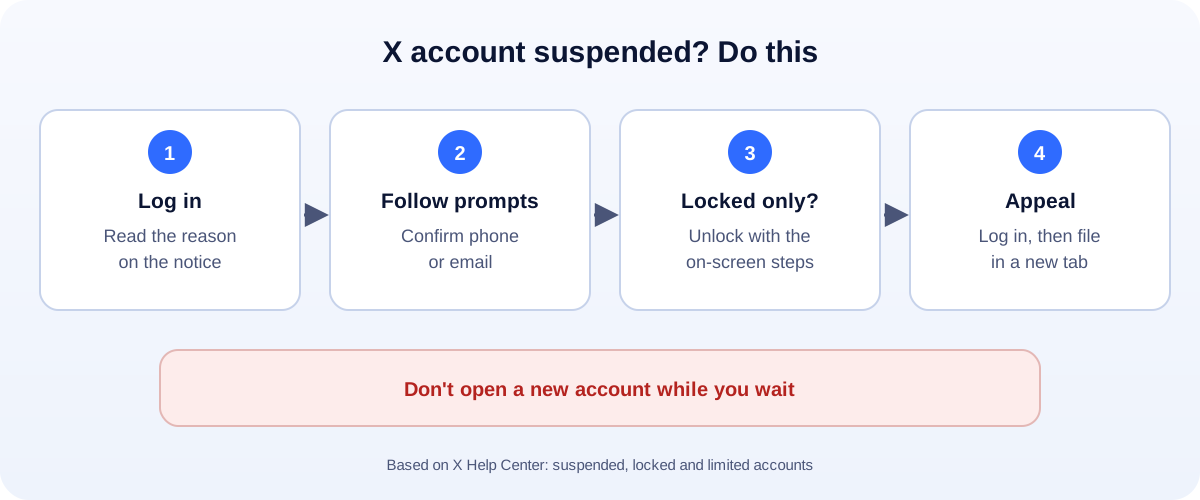
- Log in. Read what the notice says.
- Prompts for a phone or email? Follow them. That often unsuspends the account.
- Locked, not suspended? Complete the steps shown, then wait out any time limit.
- Still suspended? Stay logged in, open a new tab and file an appeal.
- Don’t make a new account. X treats it as getting around the suspension.
A suspended X account cuts you off from your followers overnight. Sometimes it’s a real violation. Often it’s an automated spam flag on a real person. Here’s what X’s Help Center says, and how to appeal properly.
Why X suspends accounts
X lists three main reasons:
- Spam. X says most suspended accounts are spammy or fake. Real people get caught too, and X says it will work with them to fix mistakes.
- Account security at risk. If X thinks your account was hacked, it may suspend it until it’s secured.
- Abusive posts or behaviour. Threats, harassment or impersonation can lead to a temporary or permanent suspension.
What often triggers a spam flag on a real account:
- Following or unfollowing lots of accounts fast.
- Posting the same reply or link many times.
- Automation tools that post, like or follow for you.
- A name or photo that looks like someone else.
Step 1: Try to unsuspend it yourself
Log in. If X asks you to add a phone number or confirm your email address, follow the instructions. X says this can unsuspend the account on its own.
Step 2: Locked instead of suspended?
A locked account is a lighter step. X may stop you posting for a set time, or ask you to verify some information. Complete what’s on the screen, then wait out the time limit. Don’t keep retrying the blocked action.
Step 3: File an appeal
If the steps above don’t work and you think X got it wrong:
- Log in to the suspended account.
- Open a new browser tab.
- Go to X’s Help Center appeal form and file an appeal.
Keep it short and calm:
- Say who you are and what the account is for.
- If you know what triggered it, say what you’ve changed (for example: “I removed the scheduling app that posted for me”).
- If you think you were hacked, say so clearly.
Appeal once, then wait. Many appeals for the same thing don’t speed it up.
Inauthentic behaviour and read-only mode
If X says your account broke its authenticity rules, that usually means spam-like activity: bulk posting, duplicate content, or fake engagement. X may put the account in read-only mode, where you can browse but can’t post, repost or like. Stop the activity that caused it and appeal if you think it’s a mistake.
Don’t do this while you wait
- Don’t open a new account. X’s rules ban evading a suspension, and it can get the new one suspended too.
- Don’t pay “unban” services. They can’t do anything you can’t.
- Don’t share your password with anyone offering help.
Get your data
Even suspended accounts can request a copy of their information through X’s Help Center. If you’ve posted years of content, it’s worth saving.
Using X for business?
One platform can switch you off at any time. Build things you own alongside it: a website, an email list, and a Google Business Profile. Tag your X links with our UTM builder so you can see which posts bring real visitors. More help: all our account recovery guides.
How UMA can help
We manage social media for small businesses, without the risky automation that gets accounts suspended. We work remotely with U.S. small businesses and others worldwide. See our social media marketing service or get in touch.
Only X decides whether an account is reinstated. This guide is general information based on the X Help Center.