The 60-second version:
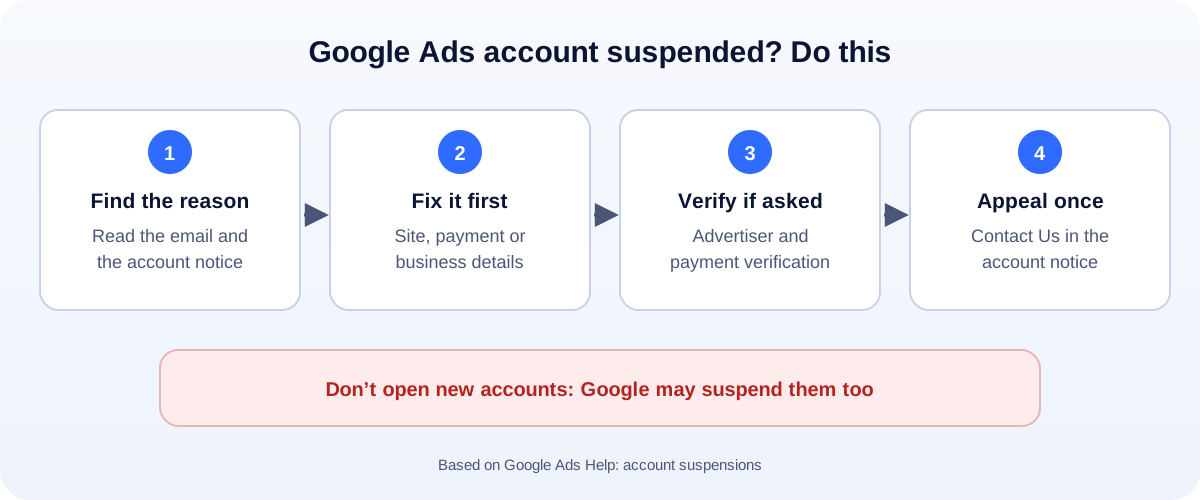
- Find the reason. It’s in the email from Google and in a red notice at the top of your account.
- Fix the cause before appealing. That could be your website, your payment details, or your business information.
- Complete any verification Google asks for.
- Appeal once, using Contact Us in the suspension notice.
- Don’t create a new account. Google may suspend that too.
A suspended Google Ads account means all your ads stop. For many small businesses, that’s the phone going quiet overnight. Here’s how to understand the reason and appeal in a way that has the best chance of working.
What Google says about suspensions
According to Google’s help page on account suspensions (Google Ads Help):
- Accounts can be suspended for egregious violations without prior warning, including “circumventing systems” and “unacceptable business practices”.
- Repeat violations follow a strike system, with notice before suspension.
- Billing issues like an unpaid balance or “suspicious payment activity” can also lead to suspension.
- Once suspended, “all ads in the suspended account will stop running.”
- And importantly: “any new accounts that the advertiser tries to create may also be suspended.”
The common reasons, in plain English
“Circumventing systems”
Google thinks the account tried to get around its rules or reviews. Examples: ads that lead to different content for reviewers than for customers, hiding what you really sell, or opening accounts to replace a suspended one.
What to check: Does your landing page show exactly what the ad promises? Are redirects, tracking or “cloaking” tools changing what people see? Did anyone open accounts for you after an earlier suspension?
“Suspicious payment activity”
Google can’t confirm the payment method or the person behind it. This is very common with new accounts.
What to check: Use a card or bank account in your business’s name, with an address that matches your business. Complete payment verification if asked. Avoid sharing one card across many unrelated accounts.
“Unpaid balance”
A charge failed or was disputed.
What to check: Pay the balance, update the payment method, and don’t file chargebacks for Google Ads charges. Resolve disputes with Google instead.
“Misrepresentation” or “unacceptable business practices”
Google thinks the ad or site could mislead people: missing business details, unclear pricing, fake urgency, or claims you can’t back up.
What to check: Show your real business name, address and contact details, clear prices and terms, a privacy policy, and honest claims. Remove “guaranteed” results and fake countdowns.
How to appeal
- Fix everything you can first. An appeal for an unchanged account rarely succeeds.
- In your account, open the suspension notice and choose Contact Us.
- Complete the form. Explain briefly and honestly what happened and what you changed: “We added our full business address and pricing to the landing page and removed the redirect our previous agency had set up.”
- Complete advertiser verification if Google asks for it.
- Wait for Google’s email. Send one appeal. Google says excessive appeals can slow processing.
If the appeal is rejected, you can re-appeal, but only once you’ve genuinely fixed what was wrong.
While you wait: keep leads coming
- Make sure your Google Business Profile is complete. It’s free and shows in Maps.
- Post on social media and reply fast on WhatsApp.
- Consider Meta ads for a few weeks. Our guide to Google Ads vs Facebook Ads explains where each one fits.
How to avoid suspensions in future
- Own your account and payment method in your business’s name. Give agencies access, not ownership.
- Keep landing pages honest and consistent with the ads.
- Don’t use cloaking, tricky redirects or “aged” accounts sold online.
- Turn on two-step verification for every user.
- Write ads within the rules: our free Google Ads character counter helps you draft clean headlines and descriptions.
How UMA can help
We set up and manage Google Ads accounts the clean way: business verification, compliant landing pages and tracking. We also help businesses recover from suspensions where it’s possible. We work remotely with U.S. small businesses and others worldwide. See our paid ads service or tell us what happened.
Only Google decides whether an account is reinstated. This guide is general information based on Google Ads Help.