Short answer: Excel is a great tool for starting a business and a poor one for running a growing trading or distribution company. If your team types the same order into several files, your stock count never matches the spreadsheet, or nobody knows exactly who owes you what, you have outgrown it. The fix is not always an expensive ERP: often it is a focused system that does five things well and joins up the rest.
Traders, wholesalers and distributors in Pakistan and the Gulf tend to hit the same spreadsheet problems as they grow. Here are the nine warning signs, what a proper system should give you instead, and how to switch without chaos.
The 9 warning signs
1. The same order is typed two or three times
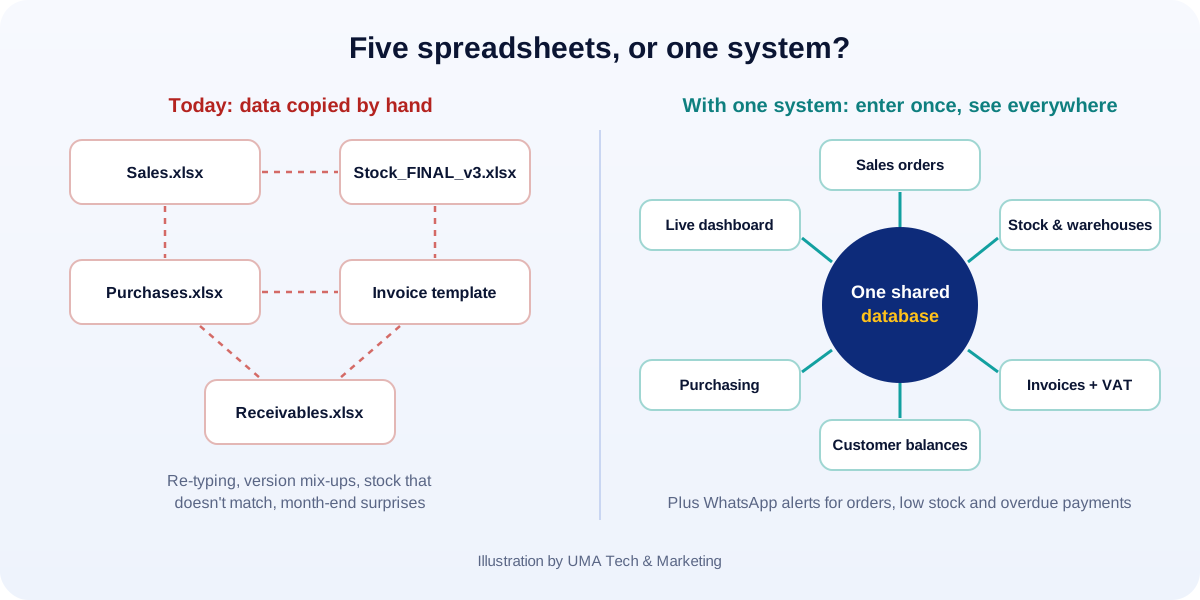
The sales team writes the order, someone copies it into the stock sheet, then someone else re-types it into the invoice template. Each copy is a chance for a wrong quantity, price or customer name, and a waste of paid hours.
2. Your stock sheet and your shelves disagree
You “have” 40 cartons on paper and 28 in the warehouse. When stock movements depend on someone remembering to update a file, the gap grows every week, and you find out when a customer is waiting.
3. There are five versions of the “final” file
Stock_FINAL.xlsx, Stock_FINAL_v3.xlsx, Stock_FINAL_Ahmed.xlsx… Every team member works from a slightly different copy, and decisions are made on numbers that are already out of date.
4. Month-end takes days, not hours
If closing the month means gathering files from sales, stores and accounts and reconciling them by hand, you are paying skilled people to do copy-and-paste. And you only see problems weeks after they happened.
5. Nobody knows exactly who owes you what
Customer balances live in one sheet, payments in another, and credit limits in someone’s head. Overdue invoices are chased late or not at all, which is often the single most expensive problem in a distribution business.
6. One person holds the whole system in their head
If the business slows down when a particular person is on leave, or the formulas only make sense to the one who wrote them, you have a key-person risk, not a system.
7. You cannot answer simple questions quickly
“Which products made the most profit last quarter?” “Which customers have stopped ordering?” “What should we reorder this week?” If answering takes a day of filtering, you are running the business on instinct, not data.
8. Branches or salespeople work in the dark
Field salespeople call the office to check stock and prices. A second warehouse or branch keeps its own sheet. Orders arrive by WhatsApp photo and get lost.
9. Compliance is getting harder
VAT returns (5% in the UAE, 15% in Saudi Arabia) and now e-invoicing demand complete, structured data: customer tax numbers, item details, correct VAT on every line. The UAE mandate starts in 2027 and Saudi Arabia’s ZATCA e-invoicing is already rolling out in waves. Spreadsheets were never designed for this. (We explain the UAE rules in our UAE e-invoicing guide.)
If three or more of these sound familiar, spreadsheets are now costing you more than a proper system would.
What a proper business system should do for a trader
You do not need every feature of a giant ERP. For most trading and distribution companies, these are the essentials:
| Area | What it should do |
|---|---|
| Items & stock | Every product with units, prices and VAT; stock by warehouse; batch and expiry dates where needed; low-stock alerts. |
| Sales | Quotes → orders → delivery notes → invoices, entered once and flowing through; customer-specific prices and discounts. |
| Purchasing | Purchase orders, goods received, supplier bills, landed cost. |
| Invoicing & VAT | Correct VAT on every line, tax-ready reports, and the ability to produce structured e-invoice data. |
| Receivables | Customer balances, credit limits, ageing reports, payment reminders. |
| Dashboards | Sales, margin, stock value and overdue balances on one screen, updated live. |
| Access & audit | Roles and permissions (a salesperson should not see margins), and a record of who changed what. |
| Mobile & WhatsApp | A simple app or web page for salespeople to check stock and take orders; WhatsApp alerts for new orders and overdue payments. |
| Languages | English and, for Gulf teams, Arabic (including right-to-left invoices where needed). |
Off-the-shelf or custom?
There is no single right answer. The honest comparison:
| Off-the-shelf (e.g. Zoho Books, QuickBooks, Odoo) | Custom or customised system | |
|---|---|---|
| Best when | Your process is fairly standard | Your pricing, stock or approval rules are unusual, or you need several tools joined up |
| Speed to start | Fast | Slower at first; the first version should still be small |
| Fit | You adapt to the software | The software adapts to you |
| Costs | Monthly subscription per user, plus add-ons | Build cost, then hosting and support |
| Risks | Workarounds when it doesn’t fit; add-on sprawl | Choosing the wrong builder; building too much at once |
A sensible path for many businesses: try a good off-the-shelf product first. If you keep hitting walls, such as special price lists, multi-branch stock or WhatsApp ordering, that is when a custom or customised system earns its cost.
How to switch without chaos: a 5-step plan
- Write down how you work today. Follow one order from enquiry to payment and note every file, form and message it touches.
- Clean the data before you move it. One list of items (no duplicates), one list of customers with correct tax numbers, and opening stock you have actually counted.
- Start small. Items, stock, sales, invoicing and customer balances first. Purchasing, dashboards and apps can follow in phase two.
- Run side by side briefly. For a short period, keep the old sheet as a check while the team uses the new system for real work.
- Train people and set one rule: if it’s not in the system, it didn’t happen. That is how you keep the data trustworthy.
Questions to ask any software provider
- Can I export all my data at any time, in a standard format?
- How do you handle VAT and e-invoicing for my country, today and after the next rule changes?
- Who owns the code and the data if we part ways?
- What does support look like: hours, language, response time?
- Can you show a working demo with my own sample data, not just slides?
How UMA can help
We build custom business systems for traders, wholesalers and distributors: inventory, sales, invoicing with VAT, customer balances and live dashboards, with WhatsApp alerts and English/Arabic support where you need them. We start with a small first version that solves your biggest headache, then grow it with you. See our app and software development and data and reporting services.
And if an off-the-shelf product is the better fit for your business, we will say so. Tell us how you run things today (even a photo of your current spreadsheet helps) and we will suggest the simplest system that would work.