
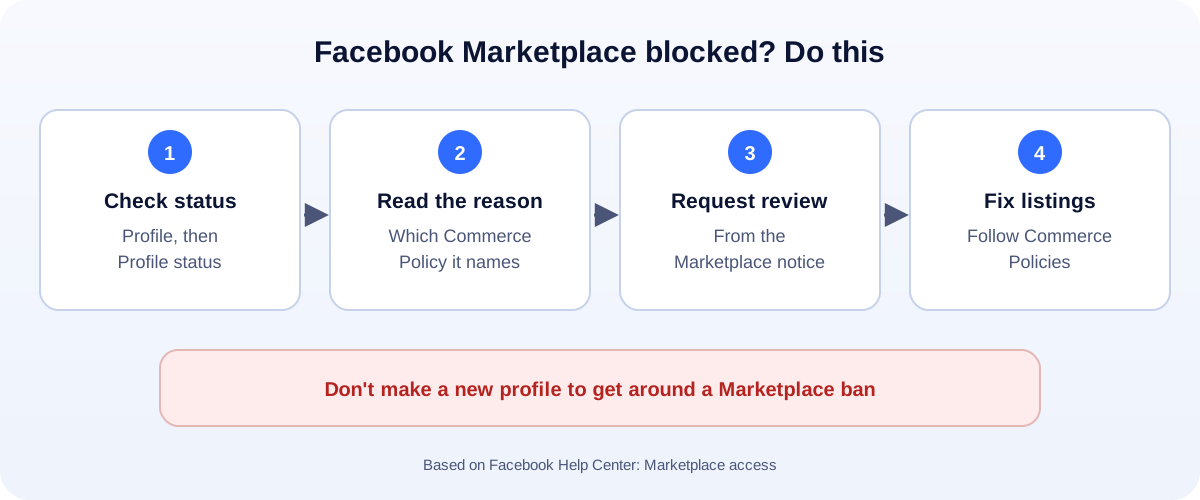
The 60-second version:
- Check your status: profile > Profile status > Extra features > Marketplace.
- Read the reason. It usually names the Commerce Policy you broke.
- Request a review if you think it’s a mistake. Do it soon: reviews may not be available after 180 days.
- Fix your listings. Remove anything on the prohibited list.
- Don’t open a new profile to keep selling.
Marketplace is where a lot of small sellers, makers and resellers make real money. When it stops working, it’s usually not a bug: Facebook has restricted access. Here’s how to find out why, and what you can do.
At risk, limited or suspended?
Facebook’s help center describes three levels:
- At risk: you’ve had a warning. Selling still works, but more violations can lead to limits.
- Limited: some Marketplace features are restricted.
- Suspended: you can’t use Marketplace until the restriction ends or a review restores it.
Rejected listings are separate. A single listing can be rejected without your whole access being touched.
Step 1: Check your status
- Go to your profile.
- Open Profile status (on the app, it’s in the menu under your profile).
- Under Extra features, select Marketplace.
This shows your current level and the listings that caused it.
Step 2: Request a review
If you think Facebook got it wrong:
- In the Marketplace notice, choose Request review (on mobile, it may say Fix now first).
- Follow the steps.
- Wait for the decision in your notifications.
Facebook says you may not be able to request a review if:
- it’s been more than 180 days since the listing was rejected,
- you’ve already requested a review, or
- a review isn’t available for the rule you broke.
Step 3: Know what you can’t sell
Most Marketplace bans come from listings that break the Commerce Policies. Common problem items include:
- Animals (including “rehoming” with a fee)
- Alcohol, tobacco and vapes
- Drugs, prescription products and supplements
- Medical and healthcare products, including medical devices
- Weapons, ammunition and explosives, including some parts and accessories
- Recalled products
- Adult products
- Fake documents, currency, gift cards or tickets that break the rules
- Used cosmetics, or cosmetics not in original packaging
And one that surprises people: services (cleaning, repairs, lessons) can’t be listed as Marketplace items.
Other reasons Marketplace may not work
Facebook has also limited Marketplace in situations like these:
- Your account is new, or Facebook hasn’t confirmed your details yet.
- You’re under 18 in a place where Marketplace isn’t open to younger users.
- Marketplace isn’t available in your country or region.
- A hacked account was used for scam listings. Secure it first: see how to recover a hacked Facebook account.
How to keep your access
- Read the Commerce Policies once, especially if you sell second-hand or handmade goods.
- Write honest listings with real photos of the actual item.
- Reply to buyers and stick to what you agreed.
- Don’t relist rejected items with small changes to sneak them through.
- Don’t spam the same listing across many groups.
Selling as a business?
If you sell regularly, consider moving beyond personal Marketplace listings:
- A Facebook Page and shop connected to your product catalog.
- A simple website with your products, so you’re not dependent on one platform.
- WhatsApp for orders: make a chat link with our free WhatsApp link generator.
- Clean product photos: our free background remover helps.
If the whole Facebook account is suspended, not just Marketplace, read how to appeal a Facebook account suspension.
How UMA can help
We set up Facebook Pages, shops and product catalogs for small businesses, and help sellers move from personal Marketplace listings to a proper online store. We work remotely with U.S. small businesses and others worldwide. See our social media marketing service or get in touch.
Only Meta decides whether Marketplace access is restored. This guide is general information based on the Facebook Help Center and Meta’s Commerce Policies.