
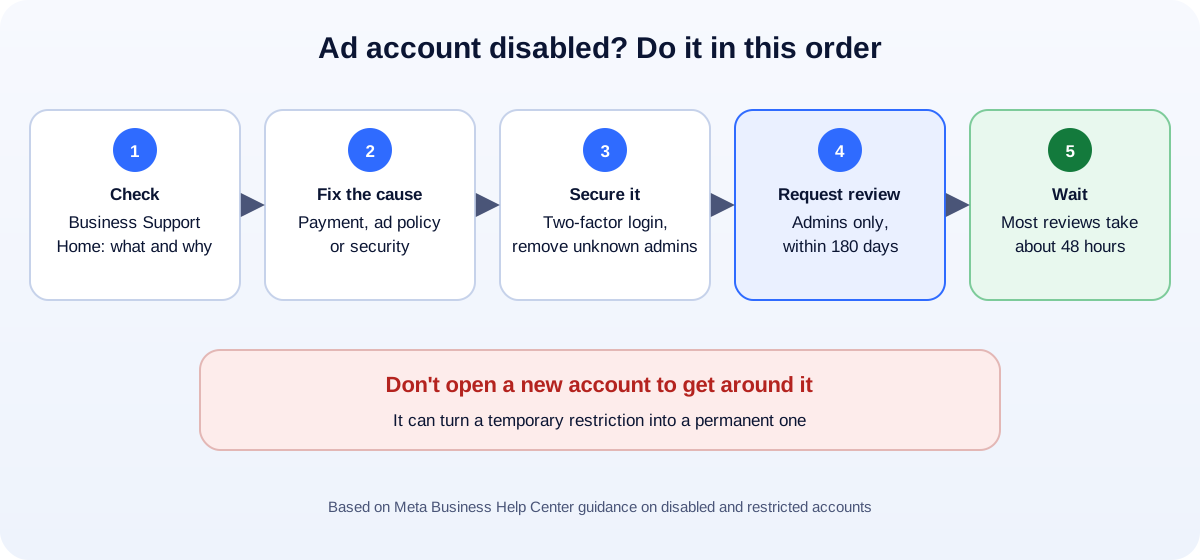
Short answer: don’t panic, and don’t open a new account. Go to Business Support Home (facebook.com/business-support-home), find out exactly what was restricted and why, fix the cause first (usually a payment problem, an ad that broke the rules, or a security issue), then click Request review. Only admins can appeal, and Meta says you have 180 days to do it and that most reviews finish in about 48 hours.
If your ads stopped overnight and you’re losing leads, here’s the calm, step-by-step way to get them running again.
Step 1: Find out what was actually restricted
“Disabled” can mean several different things, and the fix depends on which:
- The ad account is restricted (the most common case).
- Your personal profile can’t advertise, which blocks every ad account you manage.
- The Business portfolio (Business Manager) is restricted, which affects every account and Page inside it.
- The Facebook Page is restricted from advertising.
Open Business Support Home at facebook.com/business-support-home. Meta describes it as the place to review the status of your business portfolios, ad accounts and Pages, see what you can do if something was disabled or restricted, and request a review. (Meta Business Help Center) Note the exact asset that’s restricted and the reason Meta gives.
Step 2: Match the reason to the usual causes
Payment problems
A declined card, a failed payment, a chargeback or an outstanding balance is one of the most common triggers. Fix this before you appeal:
- Pay any outstanding balance.
- Remove cards that failed, and add a card in the business’s name.
- Resolve any disputed charges with your bank.
Ads that broke Meta’s advertising standards
Some categories need extra care: health and weight-loss claims, financial products, housing, employment and credit (special ad categories in some countries), and anything that sounds like a guarantee (“lose 10 kg in a week”, “guaranteed income”). Find the rejected ads in Ads Manager, delete or fix them, and read the specific policy named in the notice.
Unusual or suspicious activity
A login from a new country, a sudden big jump in daily spend, many new ads at once, or a hacked profile can all look like account takeover. Secure everything:
- Turn on two-factor authentication for every admin.
- Remove admins and partners you don’t recognize.
- Check that the email and phone on your profile are yours.
Problems with the connected profile or Page
If your personal profile or the Page has been restricted, the ad account may be blocked as a side effect. Check those in Business Support Home too.
Step 3: Request a review the right way
Once the cause is fixed:
- In Business Support Home, select the restricted account.
- Under What you can do, choose Request review.
- Complete any identity confirmation or security steps Meta asks for, such as an ID check or two-factor authentication.
- If there’s a text box, explain briefly and honestly what happened and what you fixed: “A card payment failed and was resolved on 2 October; we’ve removed the old card and added a business card.”
According to Meta, only admins can request a manual review, and you must do it within 180 days. Most reviews are completed in about 48 hours, although some take longer.
Step 4: While you wait
- Don’t create new ad accounts or Business portfolios to get around the restriction. That can break Meta’s rules and make the restriction permanent.
- Don’t keep submitting the same appeal. One clean request is better.
- Keep leads coming another way: post organically, reply fast on WhatsApp and Messenger, and consider Google Search ads in the meantime. Our guide to Google Ads vs Facebook Ads explains where each one fits.
If the review is rejected
Read the decision carefully. Sometimes Meta allows a further review; sometimes the decision is final for that account. Before trying again, be honest about whether the cause is really fixed: the same payment method, the same type of ad or the same security issue will get the same answer.
If your business genuinely can’t advertise on that account any more, talk to a specialist about the safe options for your situation. Avoid anyone selling “unbannable” or “aged” ad accounts. Buying accounts breaks Meta’s rules and puts your business at risk.
How to keep your ad account healthy
- Use a business payment method in the company’s name, and keep it funded.
- Turn on two-factor authentication for every admin, and review who has access every few months.
- Raise budgets gradually instead of jumping from $20 to $2,000 a day.
- Read the policy before advertising in sensitive categories (health, finance, housing, jobs, credit).
- Keep landing pages honest and consistent with the ad: no exaggerated claims, clear business details, a privacy policy.
- Give agencies partner access through your Business portfolio rather than sharing your login.
How UMA can help
We manage Facebook and Instagram ad accounts for small businesses, and we help diagnose restrictions, fix payment and policy issues, and set accounts up so they stay healthy. We work remotely with U.S. small businesses and others worldwide. See our paid ads service or tell us what happened.
This guide is general information. Only Meta decides whether an account is restored.