Short answer: Google Local Services Ads (LSA) put your business at the very top of Google for searches like “plumber near me,” and you pay per lead (a call, message or booking), not per click. Two big things changed recently. In October 2025, Google replaced Google Guaranteed and Google Screened with one Google Verified badge. And from August 2026, Local Services Ads are moving into Google Ads as Performance Max campaigns, starting with U.S. home service categories. Prices still vary by location, job type and lead type, so the smart move is to set your target cost per lead from what a customer is worth to you.
If you’ve been searching “Google Guaranteed vs Google Screened,” you’ve probably noticed that most articles are out of date. Here’s what LSA looks like now, what it costs, and how to get better leads from it.
What Local Services Ads are
Local Services Ads are Google’s pay-per-lead ads for local service businesses: plumbers, electricians, HVAC companies, cleaners, roofers, lawyers, real estate agents and many more. They appear above regular search ads for many local searches and show your rating, reviews, hours and verification badge.
The key difference from normal Google Ads: you’re charged when a customer contacts you, not when someone clicks. According to Google, valid leads include text messages or emails, voicemails and callback requests, answered phone calls, missed calls you return, and booking requests (U.S. and Canada). (Google Local Services Help)
Change 1: Google Verified replaced Guaranteed and Screened
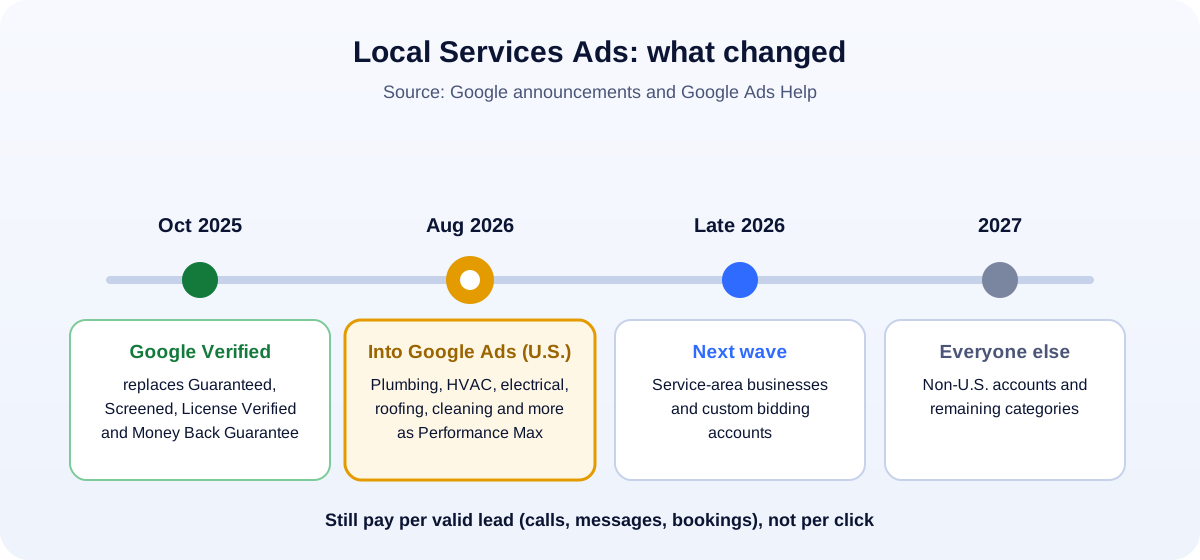
In August 2025, Google announced that it would unify its Local Services badges. The new Google Verified badge replaces “Google Guaranteed, Google Screened, License Verified by Google and the Money Back Guarantee.” (Google)
What that means in practice:
- One badge for everyone who completes the required screening and verification checks for their category.
- More detail for customers. The badge appears “alongside details of which verification checks a business has passed.”
- No separate money-back program. The Money Back Guarantee was one of the programs folded in, so don’t advertise “Google Guaranteed” on your trucks or website anymore. Update that wording.
If you were Guaranteed or Screened before, you were moved over automatically. Your job now is to keep your checks current: licenses, insurance and background checks where your category requires them.
Change 2: LSA is moving into Google Ads
This is the bigger change for anyone already running Local Services Ads. Google is moving them into the main Google Ads platform as specialized Performance Max campaigns. (Google Ads Help)
The timeline Google has published:
- August 2026: the first U.S. categories move, including plumbing, HVAC, electrical, appliance repair, house cleaning, lawn care, roofing, pest control and moving.
- Late 2026: service-area businesses and accounts with custom bidding.
- 2027: non-U.S. accounts and the remaining categories.
What changes:
- One place to manage it: budgets, targeting and replying to customers move from the separate LSA dashboard into Google Ads.
- Daily instead of weekly budgets: your old weekly budget becomes a daily average (weekly ÷ 7).
- No more manual bidding: manual bids and vertical-level Target CPA are being retired, so you’ll rely on automated bidding with targets.
- Real-time phone routing: you can change which number receives call and message leads on the fly.
What stays the same: you still pay per valid lead, and ads still show on Google Search and Maps.
Before your account moves, download your historical lead and performance reports. Google specifically recommends backing up your data first.
How much Local Services Ads cost
There’s no public price list, and anyone quoting a single “average cost per lead” for the whole country is guessing. Google says lead prices “may vary depending on your location, the job type, the type of lead, or your bidding mode,” and that message leads are usually priced lower than phone leads. (Google Local Services Help)
So work it out from your own numbers:
- Average profit per job (not revenue). Say $450.
- Close rate: how many leads turn into paying jobs. Say 2 in 5 (40%).
- Break-even cost per lead = $450 × 40% = $180.
- Target: aim well below break-even to leave profit, for example $90–$120 per lead, and see whether you get enough volume at that price.
If you can’t win leads at a price that works, the fix is usually on your side (faster answering, more reviews, better hours) before it’s the budget.
What you’re charged for, and what gets credited
Google doesn’t charge for leads it identifies as invalid at the time, and it reviews charged leads afterwards, sometimes crediting low-quality ones automatically. You can help by rating leads in your dashboard.
But some leads won’t be credited, according to Google:
- Customers who contacted you outside your business hours
- Customers who only wanted advice rather than booking
- Cancelled bookings
- Requests for a service you don’t actually offer
So the most practical cost control is simple: set accurate hours, list only the services you really provide, and pick your job types and service area carefully.
How Google ranks Local Services Ads
Your bid matters, but it isn’t everything. Google says ranking also depends on how likely you are to turn the lead into a job, based on (Google Local Services Help):
- Responsiveness. Google says “missed calls may negatively affect your responsiveness.”
- Search relevance: the job, the time of the search and the location.
- Communication options: enabling messages and bookings gives customers more ways to reach you.
- Profile quality: “your rating, number of reviews, average response time, use of high-quality images, the verification checks you have completed.”
Read that list again. Most of it is free to improve. A business that answers every call, has strong recent reviews and accurate hours can often beat a competitor who simply bids more. Our guide on how to get more Google reviews the rule-safe way helps with the review part.
Local Services Ads vs regular Google Search ads
| Local Services Ads | Google Search ads | |
|---|---|---|
| You pay for | Valid leads (calls, messages, bookings) | Clicks |
| Position | Usually top of the page for local service searches | Below LSA, above organic results |
| Badge | Google Verified, with checks shown | None |
| Control over ad text | Minimal: Google builds it from your profile | Full: you write the ads and choose keywords |
| Landing page needed | No | Yes, and it affects results |
| Best for | Home and local services with clear job types | Any business, including services LSA doesn’t cover |
Many home service businesses run both: LSA for the top-of-page, pay-per-lead calls, and Search ads to cover extra keywords, services and areas. For a wider comparison of ad platforms, see Google Ads vs Meta Ads.
Tips to get better leads for less
- Answer the phone. Every missed call costs you ranking as well as the job. Use call forwarding or an answering service during your listed hours.
- Set realistic hours. Don’t list 24/7 if nobody picks up at 2 a.m.
- Turn on messages and booking if you can respond quickly.
- Choose job types carefully. Turn off jobs you don’t want so you’re not paying for them.
- Keep reviews steady and recent. Ask every customer, the same way, every time.
- Add real photos of your team’s work (with permission), vehicles and before-and-after shots.
- Track lead-to-job rates by job type, and move budget to what actually books.
- Back up your reports before the migration, and review your settings the first time you log in to Google Ads afterwards.
Is it worth it?
For many home service businesses, yes, especially if you can answer calls fast, you have good reviews, and your average job is profitable enough to pay for leads. It’s usually not the right first move if you can’t respond quickly, you work in a category LSA doesn’t cover, or you need full control over messaging and landing pages. In that case, start with Search ads and a strong Google Business Profile.
Not sure how much to put behind it? Our guide on how much a small business should spend on marketing shows how to set a budget from what a customer is worth.
How UMA can help
We set up and manage Google Ads and Local Services campaigns for small businesses, including tracking that shows cost per booked job, not just cost per lead. We work remotely with U.S. small businesses and can help you prepare for the move into Google Ads. See our paid ads (PPC) service or get in touch.
Google changes Local Services Ads often. This guide reflects Google’s help pages as of October 2026; always check the latest in your account.