Short answer: a suspended Google Business Profile can usually be fixed, but only if you find out why it was suspended and fix that first. Open Google’s appeals tool to see which policy was applied, correct the profile so it truly follows the guidelines, gather documents that prove your business is real and at that address, and submit one clean appeal. Don’t create a new profile while you wait. That’s the step that turns a fixable problem into a long one.
If your listing vanished from Google Maps this morning and your phone went quiet, you’re not alone, and you’re right to treat it as urgent. For a lot of local businesses, the Business Profile brings in more calls than the website does. Here’s how to handle it calmly and in the right order.
Step 1: Find out what actually happened
“Suspended” gets used loosely, so start by pinning down what you’re dealing with:
- One profile is suspended. Google removed or restricted that listing because it believes it breaks a guideline. Your other profiles, if you have any, are fine.
- Your whole account is restricted. According to Google, “your account may be restricted when you violate our policy,” and that affects every profile you manage, not just one. (Google Business Profile Help)
- It’s not a suspension at all. Sometimes a profile is just waiting for verification again after you edited key details, or an edit you made hasn’t been approved yet. Check your Business Profile dashboard and your email before assuming the worst.
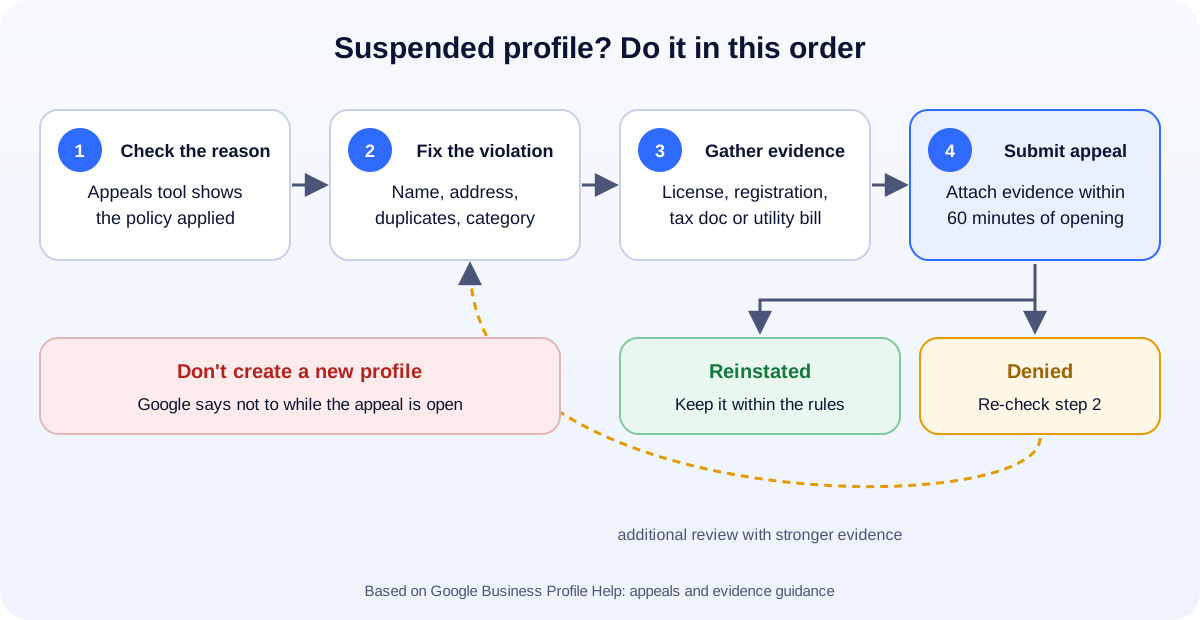
The fastest way to see the real reason is Google’s Business Profile appeals tool. Select your profile there and it shows the violation Google applied. Write it down word for word. Everything else in this guide depends on it.
Step 2: Match the reason to the usual causes
Google’s guidelines are long, but most suspensions trace back to a handful of rules. Here are the ones we see business owners trip over most, in Google’s own words. (Guidelines for representing your business on Google)
Extra words in your business name
Your name on Google has to match your real-world name: the one on your sign, your paperwork and your website. Google says “including unnecessary information in your business name isn’t permitted, and could result in the suspension of your Business Profile.” That covers taglines, service keywords, hours and city names.
So “Mike’s Plumbing” is fine. “Mike’s Plumbing | 24/7 Emergency Plumber Phoenix” is the kind of name that gets profiles suspended, even if a competitor seems to get away with it.
A virtual office, P.O. box or mailbox address
Google only allows real, staffed locations. Its guidelines say “P.O. boxes or mailboxes located at remote locations aren’t acceptable,” and that if you rent an address “but don’t operate out of that location, also known as a virtual office, that location isn’t eligible.” Coworking spaces are a gray area: Google expects a real, staffed presence at the address during the hours you list.
A service-area business showing its address
If you go to customers (cleaners, plumbers, mobile mechanics, many contractors) and don’t serve people at your address, Google says “you should hide your business address from customers.” Showing a home address as if it were a storefront is a common trigger.
Duplicate profiles
Google is clear: “Do not create more than one page for each location of your business, either in a single account or multiple accounts.” Duplicates often appear by accident: an old profile from a previous owner, or one a former marketing agency set up.
Business types Google restricts
Some businesses can’t be listed the way they’d like. For example, Google doesn’t allow businesses tied to age-restricted products such as alcohol, cannabis or weapons to be service-area businesses without a storefront. Rentals, lead-generation pages and businesses that only exist online also have specific rules.
Big edits made all at once
Changing your name, address and category on the same afternoon can send a profile back for review. It isn’t a punishment in itself, but if the new details don’t line up with what Google can confirm elsewhere, it can end in a suspension. Make important edits one at a time, and only when they reflect a real change.
Step 3: Fix the profile before you appeal
This is where most failed appeals go wrong. People submit an appeal for a profile that still breaks the rule, and Google denies it.
Before you touch the appeals tool:
- Clean up the name so it matches your signage and registration exactly.
- Fix the address. Hide it if you’re a service-area business. If you were using a virtual office, remove that address and use your real one.
- Choose the most accurate primary category, not the one you wish you ranked for.
- Check your website and other listings (Yelp, Facebook, Bing Places, your state registration) show the same name, address and phone number.
- Look for duplicates of your business on Google Maps and note them. You may need to report or remove them.
If you’re not sure which detail caused it, fix everything that could reasonably be read as a violation.
Step 4: Gather the right evidence
Google’s evidence form accepts documents such as “official business registration,” “a business license,” “tax certificates,” and “utility bills for the business,” and asks you to make sure “the business name and address match the profile.”
A few practical tips:
- Match exactly. If your license says “Smith Home Services LLC” and your profile says “Smith Plumbing,” explain the relationship or fix the name. Mismatches are the number one reason good businesses get denied.
- Use recent documents. A utility bill from three years ago doesn’t prove you’re there now.
- Have everything ready before you start. Google warns that “once you open the evidence form, you must submit it within 60 minutes or it won’t be attached to your appeal.” Scan or photograph your documents first, as clear PDFs or images.
Step 5: Submit one clean appeal
In the appeals tool, select the profile, review the violation, choose Submit appeal, and upload your evidence. Keep your explanation short and factual: what the business is, where it operates, and what you corrected.
Then wait. Google says it will email you with its decision, and reviews can take a while. While you wait:
- Don’t create a new profile. Google says it directly: “Do not create a new Business Profile for the same business while your appeal is under review.”
- Don’t keep editing the suspended profile.
- Keep the phones covered another way: make sure your website ranks for your name, update your Facebook and Yelp pages, and consider running Google Search ads for your brand name for a few weeks.
If your appeal is denied
A denial isn’t always the end. Google lets you “submit an additional review to a denied request” with more evidence. Before you do, go back to Step 2 and be honest about whether the profile really fits the rules. Common reasons for a second denial:
- The business is genuinely ineligible at that address (a virtual office, or a home address that isn’t open to customers).
- The documents don’t match the profile details.
- There’s an older duplicate profile you haven’t dealt with.
If you’re still stuck, the Google Business Profile Help Community has volunteer Product Experts who can often spot what’s wrong. Bring your exact violation message and the details you submitted.
How to keep it from happening again
- Treat your business name like a legal document. No keywords, no cities, no taglines.
- Use one real address, or hide it if you’re a service-area business.
- Keep one profile per location, managed from an account your business owns. Give agencies manager access, never ownership.
- Make important edits slowly and only when something actually changes.
- Earn reviews the right way. Buying reviews or offering rewards for them breaks Google’s rules too. See our guide on how to get more Google reviews without breaking the rules.
- Keep the rest of the profile complete and current. Our Google Business Profile checklist walks through all 15 settings that matter.
How UMA can help
We help small businesses set up and repair their local search presence: cleaning up profiles, finding duplicates, preparing appeals and making sure the website backs up what the profile says. We work remotely with U.S. small businesses and others worldwide. See our SEO services or tell us what happened to your profile, and we’ll tell you honestly whether it looks fixable.
This guide is general information based on Google’s published guidelines. Only Google decides whether a profile is reinstated.