


Social media reach comes and goes. Your email list is yours. For many small businesses, email is the channel that brings back past customers most cheaply. But since Gmail and Yahoo tightened their rules, sloppy email ends up in spam. Here’s how to start properly.
Step 1: build your list the right way
Good places to collect emails:
- At checkout or booking: “Get order updates and occasional offers” with a clear choice.
- On your website: a simple sign-up with a reason to join, like a guide, a discount or early access.
- In-store: a QR code at the counter linking to your sign-up form. Our QR code generator makes one free.
The law:
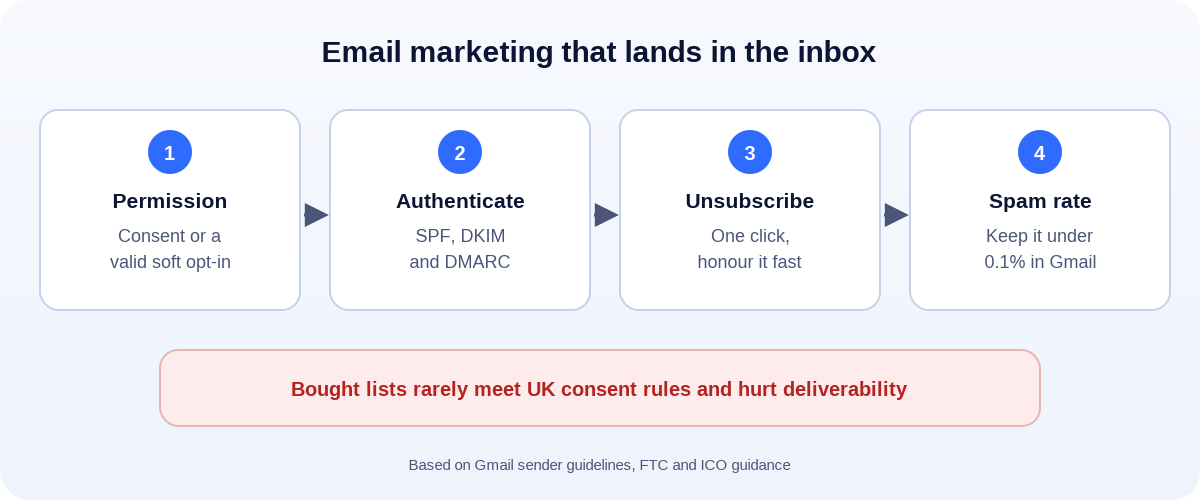
- UK (PECR): for individuals, you need consent, or the soft opt-in: you got their details during a sale or negotiation, you’re marketing your own similar products, and you gave a simple opt-out at sign-up and in every email. The ICO says bought lists can’t meet the soft opt-in.
- US (CAN-SPAM): no opt-in requirement, but every commercial email needs accurate “From” details, a non-deceptive subject line, your valid postal address, and a clear way to opt out that you honour within 10 business days. It applies to business-to-business email too.
Never buy lists. Besides the law, they generate spam complaints that hurt every future email.
Step 2: pass Gmail’s sender rules
Gmail’s requirements apply to everyone, with extra rules for bulk senders (close to 5,000+ messages a day to Gmail accounts):
- Authenticate your domain with SPF and DKIM; bulk senders also need DMARC. Your “From” domain must align.
- One-click unsubscribe in marketing emails, processed within two days.
- Keep spam complaints low: under 0.1%, and never reach 0.3%.
- Send from your own domain (hello@yourbusiness.com), not a free Gmail or Yahoo address.
Good email platforms walk you through SPF, DKIM and DMARC. If your web host manages your DNS, it’s a one-time setup.
Step 3: the first 3 emails to send
1. Welcome email (sent straight away)
Subject: Welcome to [Business], here’s what to expect Thank them, say what you’ll send and how often, and give one useful thing: a tip, a guide or a first-order offer.
2. “Our story” email (a few days later)
Subject: Why we started [Business] A short, honest story, a photo of you or your team, and your most popular product or service.
3. Helpful or seasonal email (a week later)
Subject: [3 ways to… / Your guide to…] Something genuinely useful, then one clear call to action.
Then send a regular email (monthly or fortnightly) that mixes useful content, news and offers. Aim for roughly three helpful emails for every sales email.
Step 4: write emails people open
- Subject lines: clear beats clever. Say what’s inside.
- One goal per email: one main button.
- Mobile first: short paragraphs, big buttons, small images. Compress them with our image compressor.
- Personal: write like a person, sign with your name.
- Track links with our UTM builder to see sales in Google Analytics.
Step 5: watch the right numbers
- Click rate: the best sign people value your emails.
- Unsubscribes and spam complaints: if they rise, you’re sending too often or the wrong content.
- Revenue or bookings from email, using UTM links.
- Open rate: useful as a rough trend only, because privacy features in mail apps can inflate it.
Want to know what a subscriber is worth? Our customer lifetime value calculator helps you decide how much to invest.
Black Friday and Christmas tips
Warm up your list before big sales with a couple of helpful emails, so your first email in months isn’t a discount blast that triggers spam complaints. And make sure everyone on the list actually agreed to hear from you.
How UMA can help
We set up email platforms, domain authentication, sign-up forms and automated welcome and follow-up emails for small businesses. We work remotely with U.S. small businesses and others worldwide. See our email marketing service or get in touch.
Based on Gmail’s sender guidelines, the FTC’s CAN-SPAM guide and the ICO’s PECR guidance. This is general information, not legal advice.