
Short answer: use the free WhatsApp Business app if one or two people reply to customers by hand and you message a modest number of people. Move to the WhatsApp Business Platform (the “API”) when you need a team inbox, a chatbot, automatic order or appointment messages, or WhatsApp inside your CRM. The API charges per message, so plan your costs before you switch.
In Pakistan, the UAE and Saudi Arabia, WhatsApp is often the main way customers contact a business. Picking the wrong setup either wastes money (paying for an API you don’t need) or loses sales (chats missed because one phone can’t keep up). Here is how to choose.
The two options in plain words
WhatsApp Business app. A free app you install on a phone, like normal WhatsApp but with a business profile, catalogue, quick replies, labels, a greeting message and an away message. You reply by hand. You can also use it on linked devices such as WhatsApp Web.
WhatsApp Business Platform (API). There is no app to install. WhatsApp is connected to software: a shared team inbox, a chatbot, a CRM, an online store or a booking system. Most businesses connect through a Meta partner (a “Business Solution Provider”), who gives you the inbox and tools. You pay Meta per delivered message, and usually a fee to the provider.
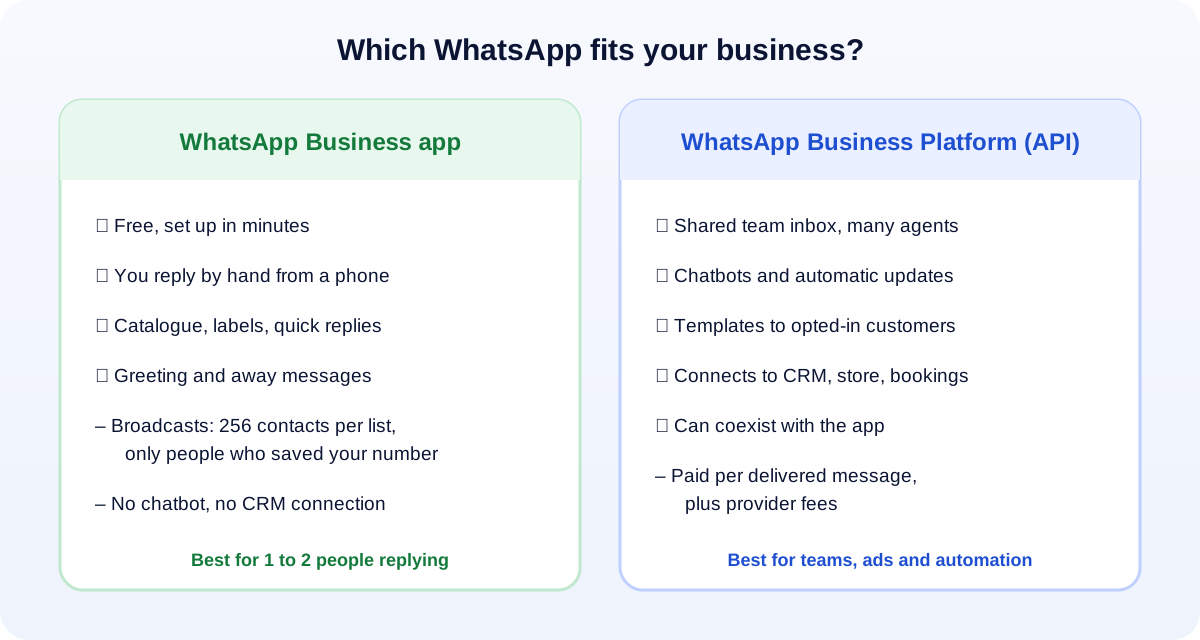
Side-by-side comparison
| WhatsApp Business app | WhatsApp Business Platform (API) | |
|---|---|---|
| Cost | Free to install | Paid per delivered message, plus provider fees |
| Who replies | You or a small team, by hand | A team inbox, a chatbot, or both |
| Broadcasts | Up to 256 contacts per list, and only people who saved your number receive it (WhatsApp Help) | Approved template messages to people who opted in, at much larger volumes |
| Automation | Greeting, away message, quick replies | Chatbots, automatic order, delivery and appointment messages |
| Integrations | Not really | CRM, online store, booking system, website chat |
| Reporting | Basic message statistics | Detailed delivery and read data, often per agent |
| Setup | Five minutes | Days to weeks: business verification, provider, templates |
When the free app is the right choice
Stay with the app if most of these are true:
- One or two people handle all customer chats.
- You get a manageable number of chats a day and can reply by hand.
- Your promotions go to existing customers who have saved your number.
- You don’t need chats to appear in a CRM or be assigned to different staff.
Make the most of it: set up the catalogue, quick replies for common questions (prices, location, timings), labels (new lead, paid, follow up) and a clear away message with your hours. These cost nothing and make you look professional.
Signs you have outgrown the app
- Chats are being missed because one phone can’t keep up, or staff share a phone.
- You need to know who replied to which customer, and how fast.
- You send the same messages again and again: order confirmations, delivery updates, appointment reminders. These are perfect for automation.
- You run Click-to-WhatsApp ads and the chats pile up after each campaign.
- You want WhatsApp inside your CRM or online store, so your sales history is in one place.
- Your broadcasts don’t reach people because they never saved your number.
If three or more apply, the API is probably worth it.
What the API really costs
Meta’s prices change, so check the current rate card before you budget. The main points as of October 2026:
- Meta charges per delivered template message, with different rates for marketing, utility and authentication templates and by the customer’s country.
- From 1 October 2026, normal replies inside the 24-hour customer service window are charged after the first 1,000 per number each month. We explain this change in our WhatsApp API pricing guide.
- Chats that start from a Click-to-WhatsApp ad get a free 72-hour window.
- Your provider adds its own monthly or per-message fee. Compare these carefully: they vary a lot.
A good rule: if the API saves even one staff member a few hours a day, or recovers a few lost orders a week, it usually pays for itself. If not, the free app is fine.
Can I keep the app and use the API too? (Coexistence)
Yes. Meta now lets businesses connect an existing WhatsApp Business app number to the API while still using the app on the same number. This is called coexistence. According to Meta’s developer documentation, once connected you keep one-to-one chats, contacts, calls, your catalogue and business tools in the app, while software sends messages through the API. (Meta for Developers)
There are limits. Meta lists, for example, that group chats don’t sync, broadcast lists become read-only, and features such as disappearing and view-once messages are switched off for one-to-one chats. Your recent chat history (up to 180 days) can be synced to the connected software.
Coexistence suits small businesses well: the owner keeps chatting from the phone they know, while order updates and a simple chatbot run automatically.
A simple decision path
- Just starting, or under a few dozen chats a day? Use the app and set it up properly.
- Busy, but replies are personal? Consider coexistence: keep the app, add automation for repeat messages.
- Several agents, ads driving lots of chats, or a CRM? Move to the API with a team inbox.
Whichever you choose, the most important habit is the same: reply fast. A customer who asked about a price on WhatsApp often asks a competitor too.
How UMA can help
We set up WhatsApp for businesses in Pakistan and the Gulf: tidy app setups, Click-to-WhatsApp ad campaigns, and API connections to websites, chatbots and CRMs. See our app development and social media marketing services, or message us and tell us how many chats you handle each day.