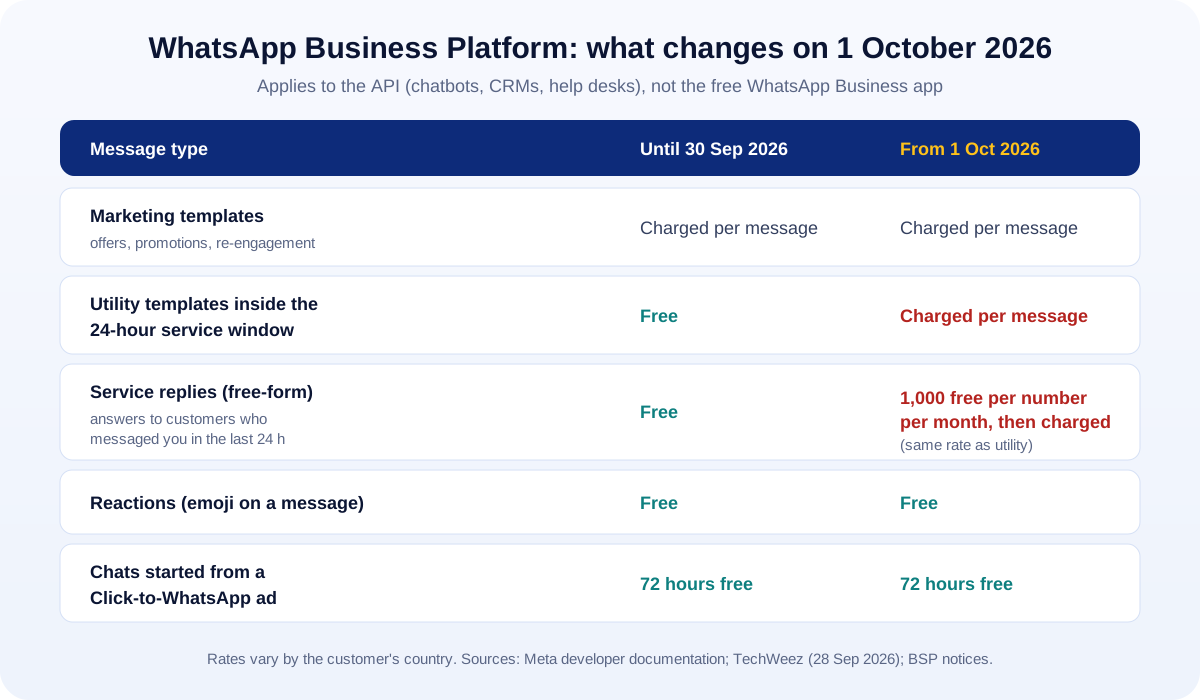
Short answer: from 1 October 2026, Meta starts charging for WhatsApp messages that used to be free. Replies you send inside the 24-hour customer service window (called service messages) are now charged after the first 1,000 per business phone number per month, and utility templates sent inside that window are charged too. This only affects the WhatsApp Business Platform (the API behind chatbots, CRMs and help desks), not the free WhatsApp Business app.
In Pakistan, the UAE and Saudi Arabia, many customers would rather send a WhatsApp message than fill in a form, so a lot of businesses run their sales and support through it. If your WhatsApp is connected to a chatbot, CRM or shared inbox, this change will show up on your bill. Here is what changed, how to estimate the impact, and how to keep costs under control.
What exactly changes on 1 October 2026
Since 1 July 2025, the WhatsApp Business Platform has charged per delivered message rather than per conversation. According to Meta’s developer documentation, you have mainly been “charged when a template message is delivered,” while normal replies inside an open customer service window were free. (Meta for Developers)
From 1 October 2026, two things change:
- Service messages become chargeable. These are the normal, free-form replies you send after a customer messages you. Each business phone number gets 1,000 free service messages a month; after that, each delivered message is charged at the same rate as a utility message in the customer’s country. The free allowance does not carry forward to the next month. (YCloud, a Meta business partner)
- Utility templates inside the service window are charged. Order confirmations, delivery updates and other utility templates used to be free when sent inside an open 24-hour window; now they are billable there too. (TechWeez)
Two things stay free:
- Reactions (an emoji on a customer’s message).
- Free entry point windows: when a customer starts the chat from a Click-to-WhatsApp ad or a Facebook page button, you get 72 hours of free messaging.
Who is affected, and who is not
Affected: any business using the WhatsApp Business Platform (API), directly or through a provider: website chat widgets that hand over to WhatsApp, AI chatbots, CRMs such as HubSpot or Zoho connected to WhatsApp, and shared team inboxes. As TechWeez notes, the change applies to “businesses using the WhatsApp Business Platform, the API that connects WhatsApp to CRMs, contact-center software, chatbots, and other systems.”
Not affected: the free WhatsApp Business app you install on a phone. If your team simply replies from the app, nothing changes for you.
Hit hardest: businesses with high volumes of back-and-forth support (delivery questions, “where is my order”, appointment changes) and chatbots that send many short messages instead of one clear answer.
How to estimate your new monthly cost
You do not need a spreadsheet model to see whether this matters. Use this quick estimate for each business phone number:
Chargeable service messages = (service replies you send in a month) − 1,000
Extra monthly cost ≈ chargeable service messages × the utility rate for your customers’ country
- utility templates sent inside the service window × the utility rate
Example (illustrative only): a distributor sends about 4,000 support replies a month from one number, plus 1,500 delivery updates inside the service window. From October, it pays for roughly 3,000 service messages (4,000 − 1,000) plus 1,500 utility messages, all at the utility rate for its customers’ country. If most customers are in one country, that is one rate to look up on Meta’s rate card or your provider’s price list.
Rates differ by country and your provider may add its own fee on top, so use the numbers on your actual invoice. The point of the estimate is to see whether you are talking about a rounding error or a real line in your budget.
8 ways to keep WhatsApp costs down (without hurting service)
1. Answer in one message, not five
Many bots and agents send a greeting, then a “please wait”, then the answer in three pieces. Every one of those is now a delivered message. YCloud recommends cutting “duplicate greetings, repeated bot replies, unnecessary message splitting.” One clear, complete reply is cheaper and better service.
2. Put the common answers where customers look first
Opening hours, price lists, delivery areas and return rules should be on your website, and ideally in a website chat assistant that answers instantly and only hands over to WhatsApp when a person is needed. (That is exactly how the assistant on this website works.)
3. Use Click-to-WhatsApp ads for new conversations
Chats that start from a Click-to-WhatsApp ad come with a 72-hour free window. If you advertise on Facebook or Instagram anyway, pointing ads to WhatsApp can make those first conversations cheaper. Our paid ads team sets these up and tracks which ads bring real leads, not just chats.
4. Send utility updates only when they add value
“Order received”, “order packed”, “order dispatched”, “out for delivery”, “delivered” is five paid messages. For most customers, two (confirmed, and out for delivery with a tracking link) do the job.
5. Check your template categories
Meta charges by template category, and marketing messages cost more than utility ones in most markets. Keep promotional wording out of utility templates, and review how your templates are categorised in WhatsApp Manager.
6. Review your provider’s markup
Many WhatsApp providers add a margin on top of Meta’s rates or charge per conversation in their own way. Now that more messages are billable, compare what you pay with Meta’s published rates for your markets.
7. Measure before you cut
Look at a normal month: how many service replies per number, how many utility templates, and which conversations never lead to a sale. Cut the waste first, not the conversations that bring revenue.
8. Keep your contact lists clean and opted in
Only message people who asked to hear from you. It keeps costs down, protects your number’s quality rating and avoids complaints, which is especially important for marketing templates.
Should you still use WhatsApp for business?
Yes, for most businesses in our region, more than ever. Customers expect it, and it is still one of the fastest ways to turn an enquiry into a sale. The change simply rewards businesses that automate thoughtfully: fewer, better messages, instant answers to common questions, and a human stepping in when it matters.
How UMA can help
We build WhatsApp and website automations for businesses in Pakistan and the Gulf, including AI assistants like the one on this website. We can:
- Review your current WhatsApp flows and show you where messages (and money) are being wasted.
- Build a website chat assistant that answers common questions and passes real leads to WhatsApp (app and software development).
- Run Click-to-WhatsApp ad campaigns that bring measurable enquiries (paid ads).
Tell us how you use WhatsApp today and roughly how many messages you send a month. We will tell you honestly whether the new pricing matters for you.
Sources
- Meta for Developers: Pricing on the WhatsApp Business Platform
- YCloud (Meta business partner): WhatsApp API message pricing update effective October 1, 2026
- TechWeez: WhatsApp Business to charge for service messages above 1,000 (28 September 2026)