Short answer: Google wants one live, unedited video of at least 30 seconds, recorded on your phone through your Business Profile, that shows three things: your business name on permanent signage (matching your profile), where you are (street signs, the building number or nearby landmarks), and proof that you manage the business (opening the register or a storeroom, or showing a business document). Plan the shot before you press record, keep it steady, and don’t show sensitive information or other people’s faces.
Video verification has become one of the most common ways Google confirms a new or edited Business Profile, and it’s where a lot of owners get stuck. Here’s how to pass the first time.
What Google requires
From Google’s own help page (Google Business Profile Help):
- At least 30 seconds long, as “an unedited, unique, and complete recording with no breaks.”
- Recorded live from a mobile device through your Business Profile. Google says you “must capture the footage live as pre-recorded videos aren’t allowed.”
- Proof the business exists: your “business name is clearly printed on a permanent fixture, like a signboard, wall, or window,” and it must match the name on your profile.
- Proof of location: for storefronts, things like “street signs, building numbers, nearby businesses, or familiar places.”
- Proof of management: for example “opening a cash register, kitchen, storage room, or using a point-of-sale system,” or showing “business documents like a business permit, invoice, or utility bill.”
And what not to show: “sensitive info like bank account, tax, or ID numbers,” private information, or “other people’s faces.”
A 30-second shot plan that works
Rehearse it once without recording. Then:
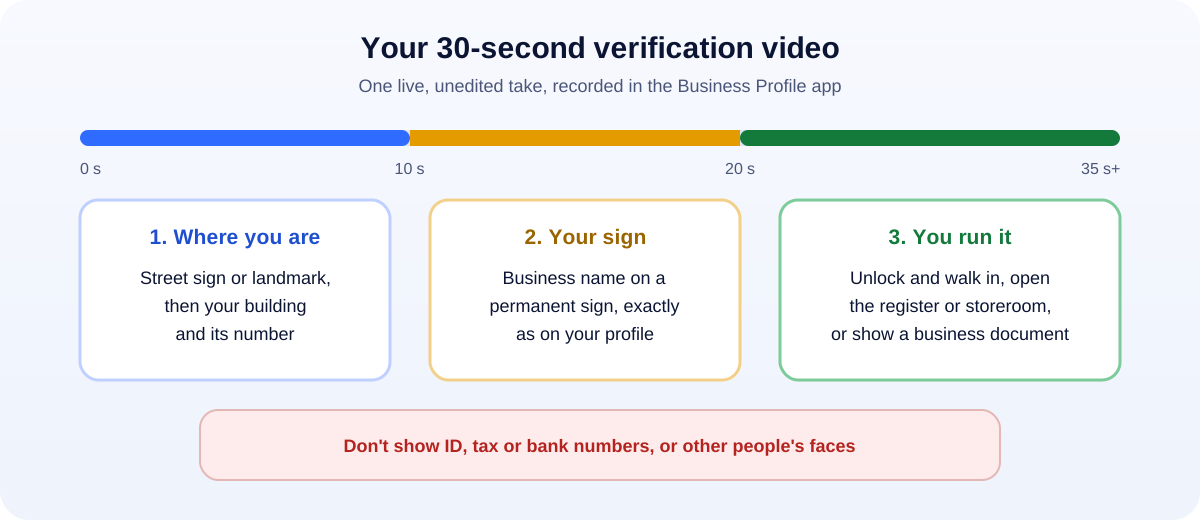
- Start outside (0–10 s): show the street sign or a recognizable landmark, then pan to your building and its number.
- Show the sign (10–20 s): walk to your entrance and hold steady on your business name on the sign, window or wall.
- Prove you manage it (20–35 s+): unlock the door and walk in, open the register or POS, show the stockroom or tools, or show a business document (with any account or tax numbers covered).
- Keep going until you’re past 30 seconds. A little longer is fine; cutting it short isn’t.
Tips that prevent most rejections
- Match the name exactly. If your profile says “Smith Plumbing” but your sign says “Smith Home Services”, fix the profile name first. See our guide on what to do when your profile is suspended for why names matter so much.
- Record in daylight and keep the phone steady. Slow, smooth movements.
- Use a good connection. The video uploads as you record, so stand where your signal is strong or use Wi-Fi.
- One continuous take. No stopping, editing or filters.
- Avoid people’s faces. Record before opening or when the shop is quiet.
Service-area businesses (no shop)
If you go to customers (plumbing, cleaning, mobile services), Google asks you to show your location with things like the “street name and building number” or “business signs near your service area,” and to prove you manage the business. In practice, owners often use business documents (Google lists permits, invoices and utility bills), plus anything that clearly carries the business name, such as a work vehicle or branded equipment.
If there’s no permanent signage at your address, Google says to “list it as a service-area business instead of storefront.” Choosing the right type before recording avoids an automatic mismatch.
What happens next
Google says review takes up to 5 business days. You’ll either be verified, or you’ll get feedback explaining what was missing. If rejected, read the reason carefully, fix it (usually the name, the location proof or the management proof), and record again.
Once you’re verified, make the most of it. Our Google Business Profile optimization checklist covers the 15 settings that help you rank, and our free Google review QR code generator helps you start collecting reviews.
How UMA can help
We set up, verify and optimize Google Business Profiles for local businesses, and help fix the name, category and website details that cause verification problems. We work remotely with U.S. small businesses and others worldwide. See our SEO services or get in touch.
Google changes its verification options from time to time. This guide reflects Google’s help pages as of October 2026.